


You know that street game where the performer (con artist?) has three opaque cups and a small ball. He places the cups upside down on the table, with the ball under one of the cups. He quickly shuffles the cups around and then asks the player to guess which cup has the ball. You’ve seen the game on TV, even if you’ve not seen it in real life.
Following what’s happening when you have a chain of iterators in Python can feel like playing that game. But, unlike the street game, there are no scams when you’re playing the iterator game. Let’s make sure you’ll always win.
I’ll keep this article short. I wrote many articles about iterables and iterators. If you need to refresh your memory, have a look at The Anatomy of a for Loop and A One-Way Stream of Data • Iterators in Python (Data Structure Categories #6).
Follow The Data in a Chain of Iterators
Let’s keep the example simple. Start with this list in a REPL session:

A list is iterable. You can create an iterator from any iterable. Let’s create an iterator from this list:

The built-in function iter() creates an iterator from an iterable. Iterators don’t contain data. They don’t create copies of the data. They’re lightweight objects that create a stream. They’ll fetch data from the original source, which is the list boring_numbers in this case, as and when needed.
Iterators can only fetch an item once. So, they’re a one-way stream. Once you use an item, it’s gone from the iterator – but not from the original list, which remains unchanged.
Therefore, first_iter is an iterator that relies on data from the list boring_numbers. But let’s not fetch any items from the first_iter iterator. Not yet, anyway.
Create a second iterator. This time, you’ll use a generator expression. Generators are iterators, so you create a second iterator with this code:

Note that the expression on the right-hand side of the equals sign is enclosed in parentheses – the round ones, to be clear. This is a generator expression, which creates a generator iterator. Read Pay As You Go • Generate Data Using Generators (Data Structure Categories #7) for more on generators.
As we said, generators are iterators.
The second_iter iterator generates data from first_iter, which is itself an iterator. Iterators are also iterable, which is why you can use them directly in a for clause or anywhere else you’d generally use an iterable. The second_iter iterator will yield the values as floats. But you’ve not yielded any value from this iterator either. Not yet.
Let’s go a step further and create a third iterator, which is also a generator in this case. You build this third iterator from the second one, second_iter:

The generator iterator third_iter yields the sum of 0.5 and the value yielded by second_iter.
Incidentally, I used a “standard” iterator and two generator iterators in this example. However, for the journey we’re following in this article, it doesn’t matter whether we’re using a basic iterator or a generator iterator. If you prefer, you can repeat this exercise with iterators you get from iter() directly.
Don’t Blink • Follow the Data
You started with a list called boring_numbers. This data structure contains* the data. It’s where the data lives. We’ll be following the data in this section. So it’s important to know where it’s stored!
*Note: Lists, like all data structures, don’t really contain data in the purest sense of the word. See What’s In A List—Yes, But What’s Really In A Python List for more on this. But in general, it’s fine to talk about a list ‘containing’ items of data.
You then create three iterators. The first uses data from boring_numbers. The second iterator uses data from the first. And the third iterator uses data from the second.
But you haven’t tried to fetch any value from any of the iterators yet.
Let’s look at what each iterator is doing at the moment before you fetch any values. The first iterator, first_iter, is pointing at the first item in boring_numbers. It’s ready to read this value and yield it.
The second iterator, second_iter, is pointing at the first item in first_iter. But first_iter doesn’t have any data. Iterators don’t have their own data. But that’s OK. Whenever second_iter needs to fetch the value, it will ask first_iter to fetch and yield its “first” value. I put “first” in quotation marks because you’ll see later that this may or may not be the first value.
Finally, third_iter is pointing at the first item in second_iter. The same logic applies. When third_iter needs the first item, it will ask second_iter for its “first” item, and second_iter will need to ask first_iter for its “first” item. And first_iter is pointing at the first item in the list boring_numbers.
Are you with me? Let’s complicate things a bit…
Note how your code so far includes the following lines:

None of the iterators has yielded any value. For now.
Let’s jumble things up and start by fetching the first value from second_iter:

You ask for the next value in second_iter, which is the first one since you haven’t yielded any values yet.
As you’ve seen earlier, second_iter needs the first value from first_iter. So, behind the scenes, Python calls next(first_iter), which yields the first item from boring_numbers.
So, first_iter reads the first value from boring_numbers, which is the integer 1, and it yields it to second_iter, which then yields the transformed version to the REPL as the return value of next(second_iter). That’s why the output is the float 1.0. The first iterator, first_iter, now moves to point at the second item in boring_numbers, ready for when it’s needed.
Note that boring_numbers doesn’t change in this process. The first item in boring_numbers remains there. It doesn’t disappear.
So far, so good?
Continue in the same REPL session and try the following:

You ask third_iter to give you its “next” value. You haven’t used third_iter anywhere so far. So, you might expect it to yield the “first” value.
And it does.
But its interpretation of what’s the “first” item may be different to what you expect.
Let’s follow the data. When you call next(third_iter), the third iterator asks second_iter for its next item. The second iterator, second_iter, relies on first_iter, so it asks first_iter for its next item. And first_iter, as you may recall, is currently pointing at the second item in boring_numbers, which is the integer 2.
So:
The first iterator
first_itergets the integer2fromboring_numbersand yields it tosecond_iter. Andfirst_iternow points at the third item inboring_numbers.Then,
second_itertransforms this value into a float and yields2.0tothird_iter.Finally,
third_iteradds0.5to this value and yields2.5, which is what you see displayed in the REPL.
When you called next(second_iter) earlier in the code, you used up the first item in second_iter, which in turn used up the first item in first_iter. Since this first value is gone and since third_iter depends on the data yielded by second_iter and first_iter, the earlier call to next(second_iter) also affected the iterator that’s downstream, third_iter.
What will happen if you call next(first_iter) now? Try to follow the data in your head before trying it out or reading on.
.
.
Have you worked it out?
.
.
Let’s run the code:

Although it’s the first time you explicitly use first_iter in your code, you already used two of its values when your code yielded values from iterators downstream. Therefore, the next item in first_iter is the third item in boring_numbers, the integer 3.
Let’s finish with one more expression, still running in the same REPL session:

You call next(third_iter), which asks second_iter for its next item. And second_iter asks first_iter for its next item. At this stage in the process, first_iter is pointing at the fourth item in the original source of data, which is the list boring_numbers. That’s why the output is 4.5.
Independent Iterators
Consider the following code, which is similar to the one you wrote above but has one extra line:
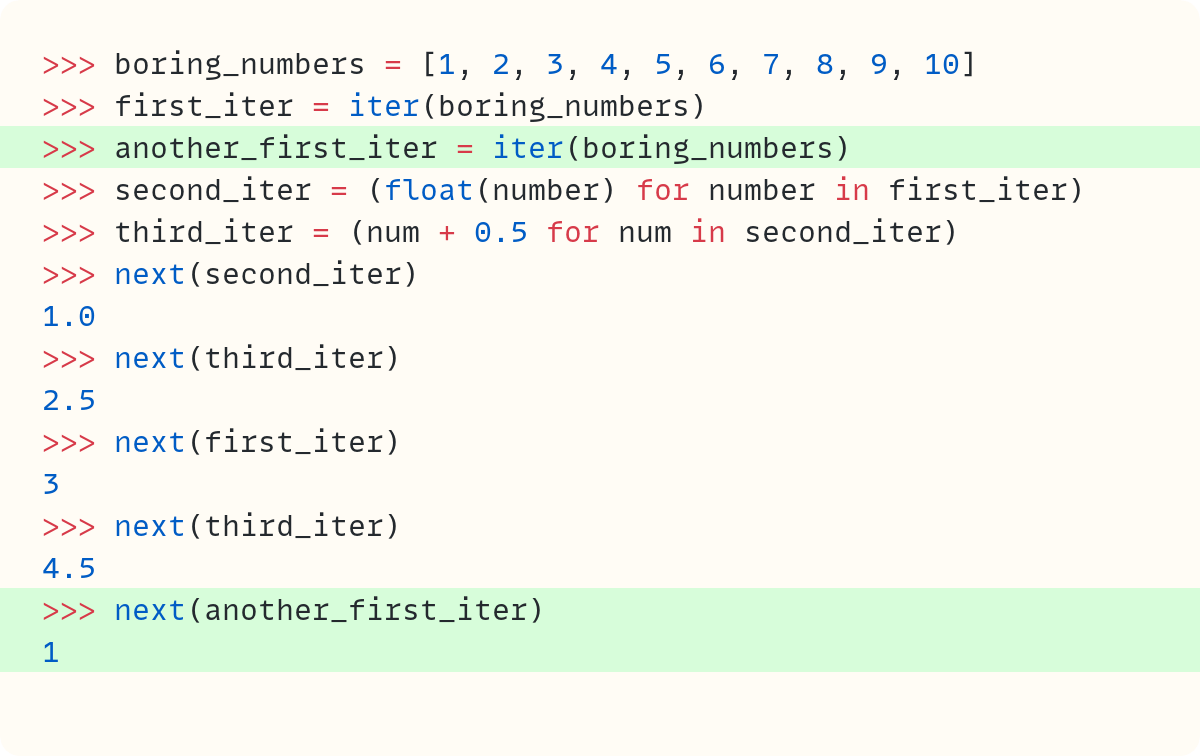
The iterators first_iter and another_first_iter both use the same source of data, boring_numbers. However, they are independent iterators. Note that when you use up some of the elements in first_iter, the independent another_first_iter is not affected. The first time you ask for the first item in another_first_iter, you get the integer 1.
Final Words
Iterators don’t contain data. They rely on data that’s stored elsewhere. But you can have a chain of iterators, each asking the previous one to yield a value. Weird things can happen if you’re not careful. But now you know how to follow the data when you have a chain of iterators.
As a rule of thumb, if you create an iterator that depends on another iterator, you should only use the final iterator to avoid these issues. So, in the example above, you should only yield values from third_iter.
Have a play with this example and make your own chains of iterators, too. And once you’re comfortable with this, get ready to be confused again with my next article, which will discuss itertools.tee()!
And next time you pass by someone in the street offering to let you play the three-cups-and-ball game, don’t feel overconfident because of your iterator knowledge – it won’t help you find the ball.

Code in this article uses Python 3.14
The code images used in this article are created using Snappify. [Affiliate link]
Join The Club, the exclusive area for paid subscribers for more Python posts, videos, a members’ forum, and more.
For more Python resources, you can also visit Real Python—you may even stumble on one of my own articles or courses there!
Also, are you interested in technical writing? You’d like to make your own writing more narrative, more engaging, more memorable? Have a look at Breaking the Rules.
And you can find out more about me at stephengruppetta.com
Further reading related to this article’s topic:
A One-Way Stream of Data • Iterators in Python (Data Structure Categories #6)
Pay As You Go • Generate Data Using Generators (Data Structure Categories #7)
Appendix: Code Blocks
Code Block #1
boring_numbers = [1, 2, 3, 4, 5, 6, 7, 8, 9, 10]Code Block #2
# ...
first_iter = iter(boring_numbers)
Code Block #3
# ...
second_iter = (float(number) for number in first_iter)
Code Block #4
# ...
third_iter = (num + 0.5 for num in second_iter)
Code Block #5
boring_numbers = [1, 2, 3, 4, 5, 6, 7, 8, 9, 10]
first_iter = iter(boring_numbers)
second_iter = (float(number) for number in first_iter)
third_iter = (num + 0.5 for num in second_iter)
Code Block #6
# ...
next(second_iter)
# 1.0
Code Block #7
# ...
next(third_iter)
# 2.5
Code Block #8
# ...
next(first_iter)
# 3
Code Block #9
# ...
next(third_iter)
# 4.5
Code Block #10
boring_numbers = [1, 2, 3, 4, 5, 6, 7, 8, 9, 10]
first_iter = iter(boring_numbers)
another_first_iter = iter(boring_numbers)
second_iter = (float(number) for number in first_iter)
third_iter = (num + 0.5 for num in second_iter)
next(second_iter)
# 1.0
next(third_iter)
# 2.5
next(first_iter)
# 3
next(third_iter)
# 4.5
next(another_first_iter)
# 1
For more Python resources, you can also visit Real Python—you may even stumble on one of my own articles or courses there!
Also, are you interested in technical writing? You’d like to make your own writing more narrative, more engaging, more memorable? Have a look at Breaking the Rules.
And you can find out more about me at stephengruppetta.com