


You have a class called Product that has an attribute called .selling_price. You also have an instance of Product assigned to the variable name coffee.
What happens when you write coffee.selling_price?
Sure, I know you know. The code returns the value of the .selling_price attribute. But what really happens behind the scenes?
Python operations rely on special methods. The dot you use to access attributes is no exception. But strange and weird things can happen when you use the dot.
Normally, the Product class determines what happens when you write coffee.selling_price. It checks whether the instance has a .selling_price attribute, typically by looking in its .__dict__ dictionary of attributes. If the instance doesn’t have this attribute, Python checks whether it’s a class attribute.
But sometimes the class doesn’t get to decide what happens when you write coffee.selling_price. The object in .selling_price could take control of the attribute lookup.
Let’s explore the weird and wonderful world of descriptors in Python. For such a long time, I struggled to understand descriptors. But, as with many topics, at some stage, everything clicks. The story makes sense. Hopefully, this article can help you make sense of descriptors.
But first, we’ll start with properties.
The Product Class
Let’s create a Product class to deal with products for sale in a shop:
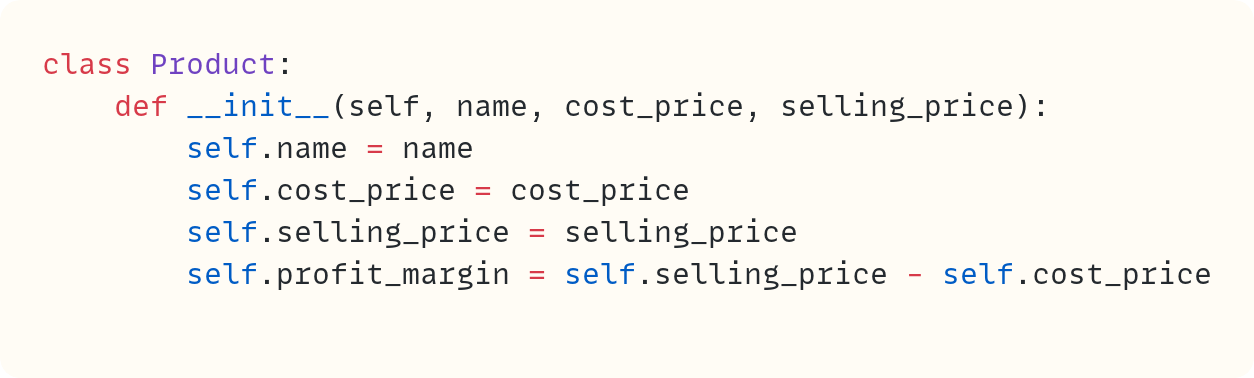
You create a Product instance by providing a name, a cost price, and a selling price. There’s a data attribute for each of these values. There’s also a .profit_margin data attribute.
However, there’s a serious flaw in this code. Have you spotted it?
Let’s try it out:

This code outputs the following:
coffee.profit_margin=2.0So far, so good. But now try the following update:

Here’s the output from this version:
coffee.profit_margin=2.0The profit margin still shows as £2. This is incorrect since you modified the selling price to £5.50 soon after creating the Product instance. The cost price is still £2.50. Therefore, the profit margin should be £3.
The .profit_margin data attribute is only calculated once in the .__init__() method, which is called when you create and initialise the object. The code doesn’t update the .profit_margin data attribute when you update the selling price.
You can choose to use a method instead of a data attribute, say .calculate_profit_margin(). However, you think the class’s interface would be neater and easier to use if .profit_margin were still a data attribute like .cost_price and .selling_price.
The solution is to create a property. I promise that this is related to this week’s topic – properties are a great stepping stone towards descriptors:
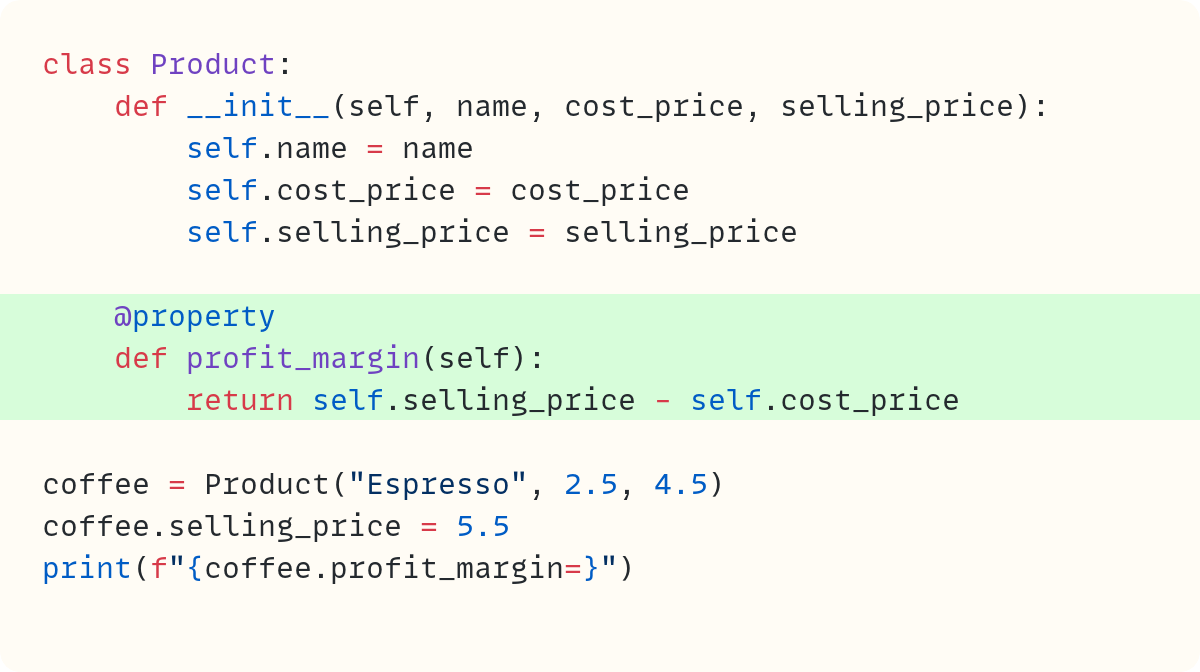
You start by creating a method called .profit_margin(). Note how you name this in the style of a data attribute rather than a method – it describes data rather than an action. However, you use the decorator @property to create a property object.
Whenever you access the .profit_margin attribute, without the parentheses, Python calls the .profit_margin() method behind the scenes. Therefore, each time you access the attribute .profit_margin, which is now a property, Python calculates and returns the current value:
coffee.profit_margin=3.0The .profit_margin attribute looks and feels like a data attribute but behaves like a method.
There’s another benefit in this case. This attribute is read-only:

You try to assign a new value to the .profit_margin attribute, but Python raises an error:
Traceback (most recent call last):
  ...
    coffee.profit_margin = 4
    ^^^^^^^^^^^^^^^^^^^^
AttributeError: property ‘profit_margin’ of
    ‘Product’ object has no setter
In this case, this is the desired behaviour since a user shouldn’t be able to set the profit margin directly. It should be calculated from the cost price and the selling price.
Validating Prices
But let’s move to the central theme of this article. You want to add validation to the prices. For example, you want to ensure they can’t be below zero.
Let’s work on the cost price only for now. The following version won’t work for the same reason you saw earlier:
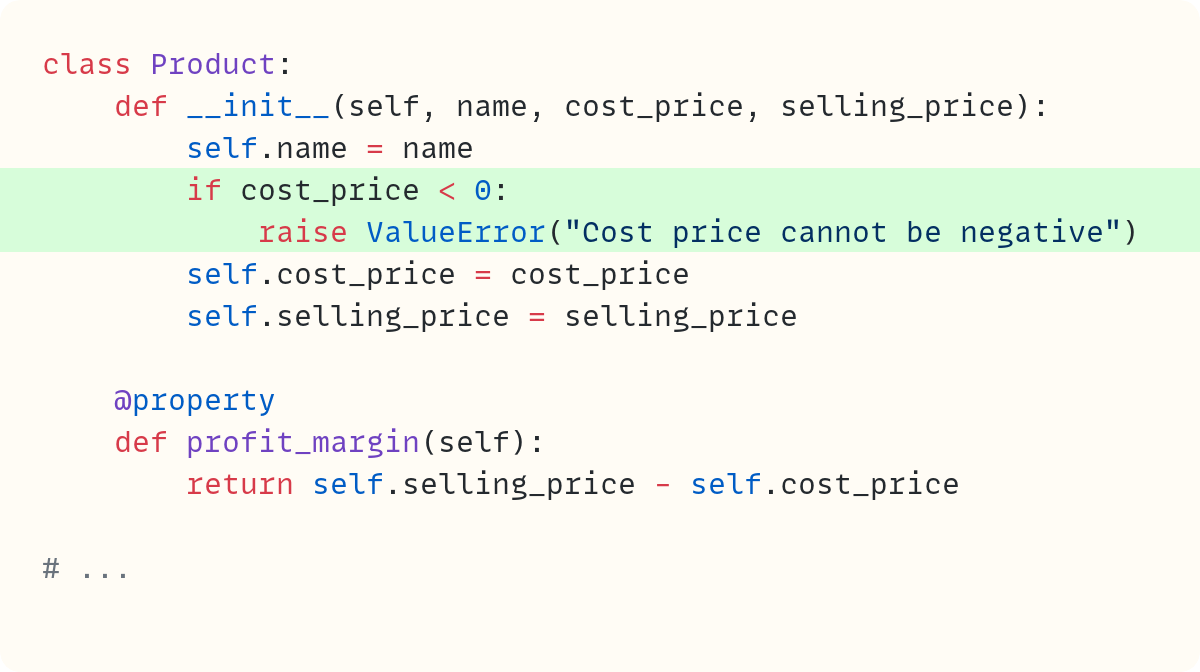
You add the validation in the .__init__() method. This will apply only to the initialisation process, not to any later changes to the cost price.
So, the validation works fine in this case:

This raises the exception:
Traceback (most recent call last):
  ...
ValueError: Cost price cannot be negative
However, the code won’t stop you from changing the cost price to a negative value later:

Here’s the output:
coffee.cost_price=-1Solution? Create a property:
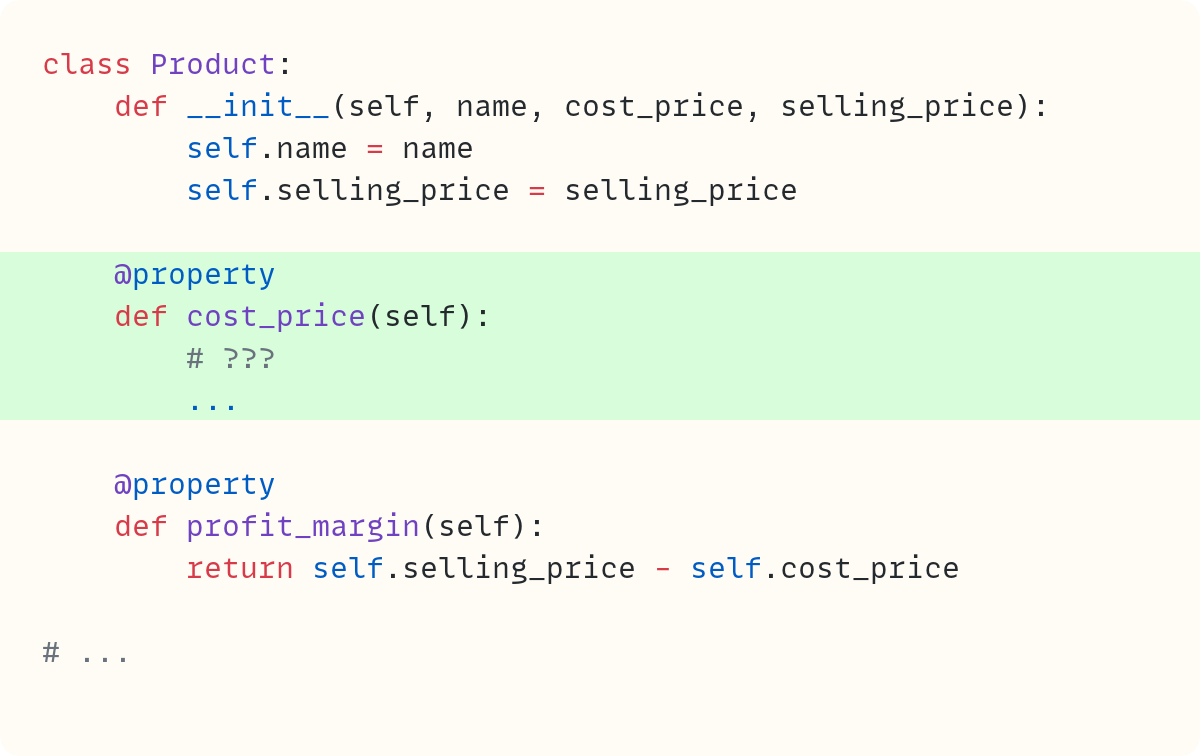
Note that I removed the validation code from the .__init__() method. The definition of the .cost_price data attribute in .__init__() has also gone.
But what do you include in the cost_price() method? Unlike the .profit_margin property, which can be calculated from existing attributes, you still need somewhere to store the current value for the cost price. You still need a data attribute that you create in the .__init__() method.
You can create a non-public data attribute:
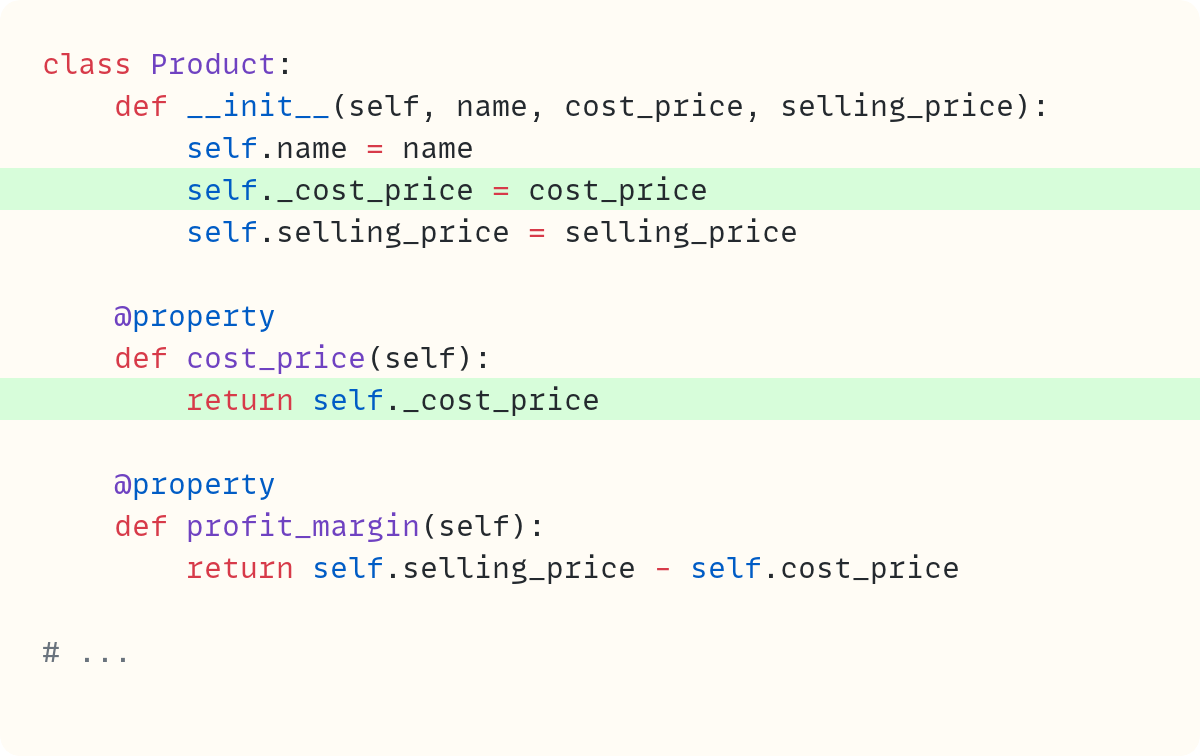
The data attribute ._cost_price has a leading underscore, which is a Python convention indicating that the user shouldn’t access this attribute directly. Python doesn’t prevent the user from accessing this non-public attribute, but the leading underscore shows the programmer’s intent that this attribute should be left alone when using the class.
Whenever you access the .cost_price property, Python executes the code you define in the method that you decorate with the @property decorator. In this case, Python returns the value of the ._cost_price data attribute.
Therefore, you still have a data attribute – the one with the leading underscore. However, the user doesn’t access it directly. Instead, they access it through the property .cost_price:

Here’s the output from this code:
coffee.cost_price=2.5However, this makes the cost price read-only. That’s not what you’re trying to achieve:

This raises an error since you can’t assign values to the .cost_price property:
Traceback (most recent call last):
  ...
    coffee.cost_price = 3
    ^^^^^^^^^^^^^^^^^
AttributeError: property ‘cost_price’ of
    ‘Product’ object has no setter
Note what the error message says: 'Product' object has no setter. The setter is the method that allows you to set the value of a property. But you can add this setter to your code:
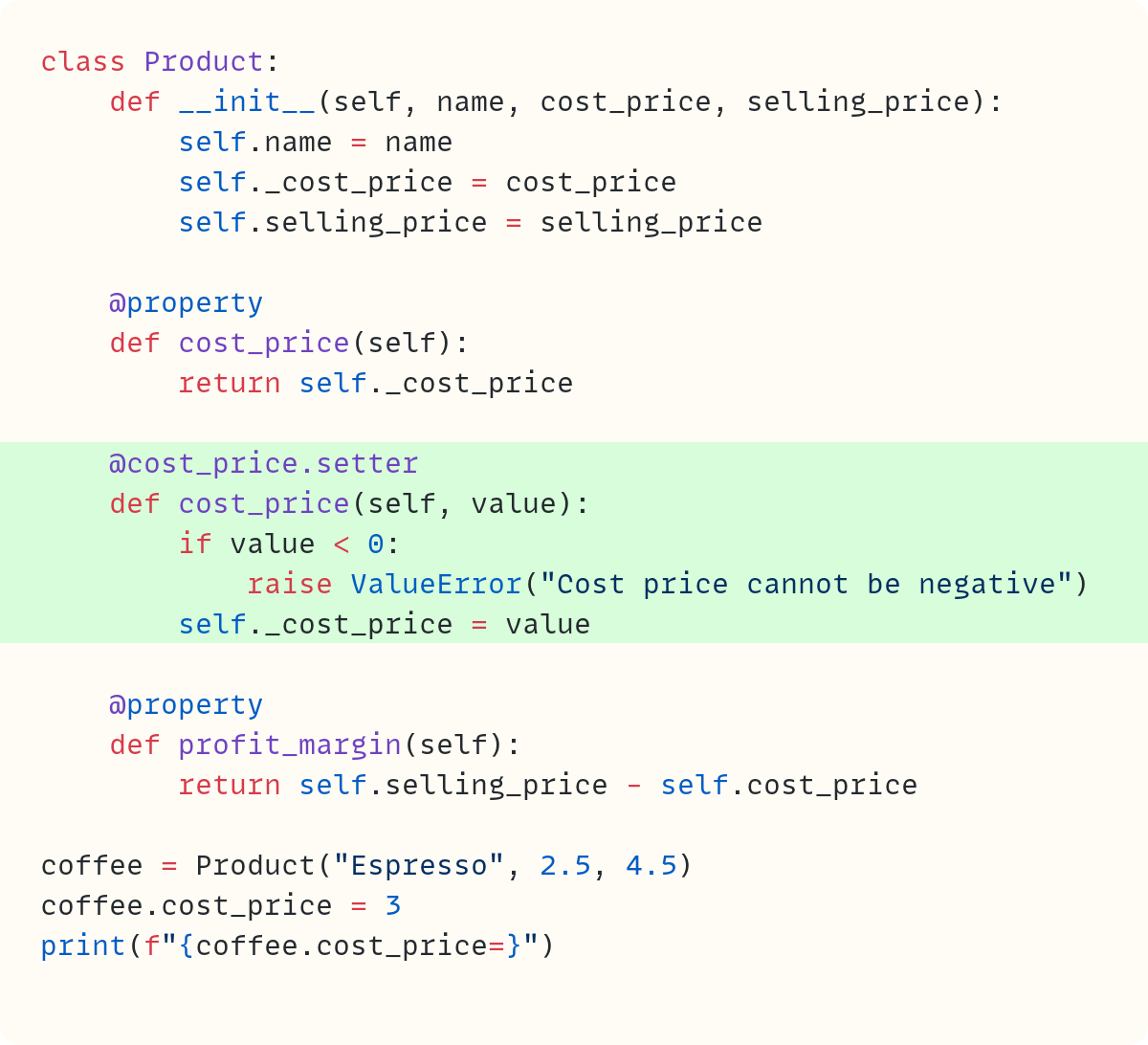
There are no issues with setting the value for coffee.cost_price now that you have a setter, too. And the validation works when you try to set the cost price value to a negative value:

This raises an error:
Traceback (most recent call last):
  ...
    coffee.cost_price = -3
    ^^^^^^^^^^^^^^^^^
ValueError: Cost price cannot be negative
However, there’s still a flaw in this code. The negative cost price validation still fails in some circumstances. Can you figure out when it fails?
Try this code:

Here’s the output:
coffee.cost_price=-2.5Validation occurs only when you set the cost_price attribute. However, look carefully at the code in your .__init__() method. It still sets the actual data attribute ._cost_price directly. This bypasses the verification.
Luckily, there’s an easy fix:
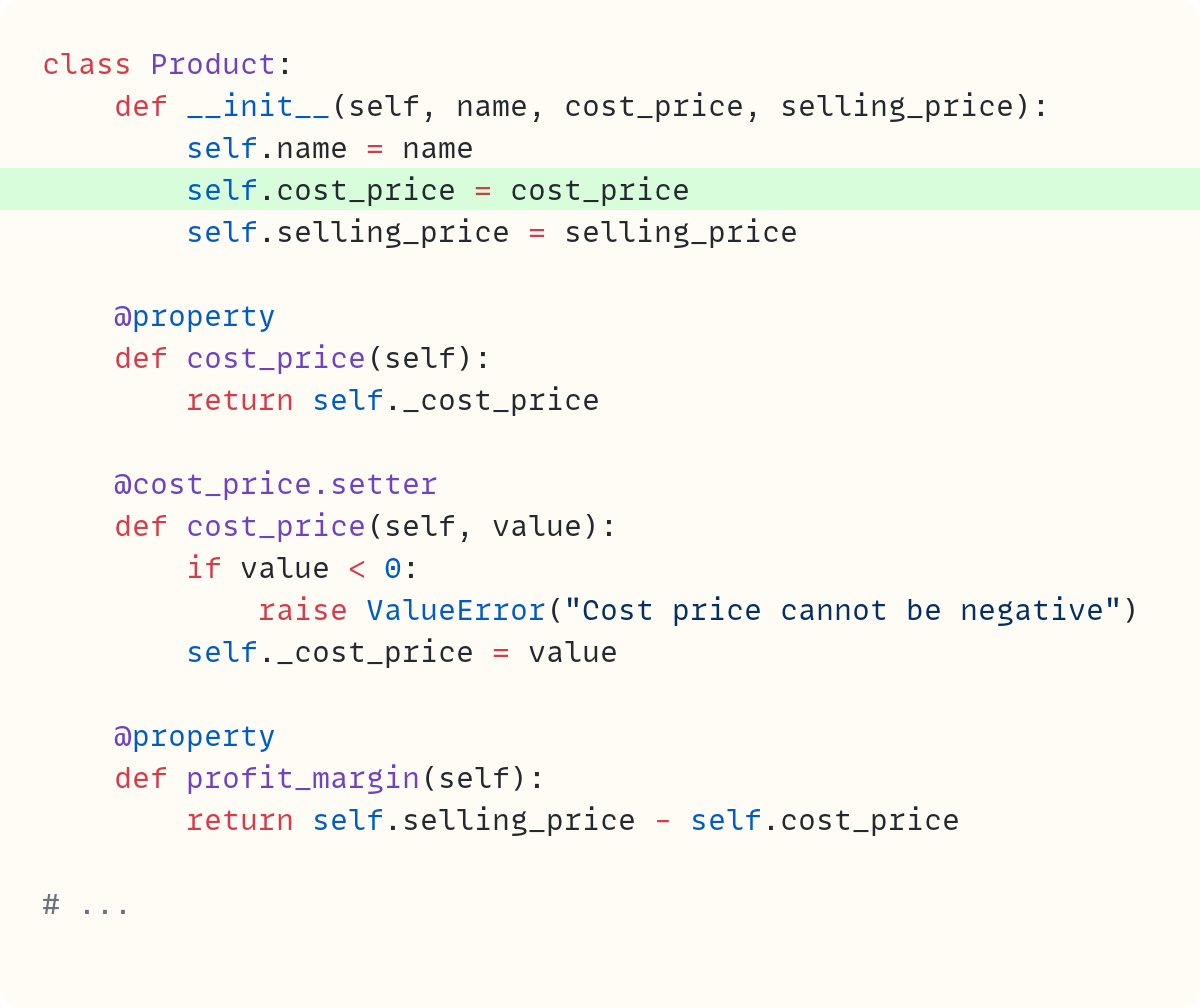
You can use the property in the .__init__() method, too. This triggers the property’s setter, which creates the ._cost_price data attribute and stores the value in it.
Avoiding float for prices
Let’s add a bit more to the validation code. It’s best not to use float when dealing with prices since floats suffer from rounding errors, which may lead to issues when dealing with money (especially if the rounding goes against you!)
Here’s the classic example showing the floating-point rounding errors:

Some floats cannot be represented precisely in binary, leading to rounding errors.
One option is to work in cents or pence or whatever the smaller unit of the currency you’re using. This means you’re working with integers. However, an alternative is to use decimal.Decimal instead:

Note that you should pass the floats as strings to Decimal and let the Decimal class deal with that. If you use float objects, you’ve already included the rounding errors in your starting value!
Let’s make sure the cost price uses Decimal internally without forcing the user to use this data type:
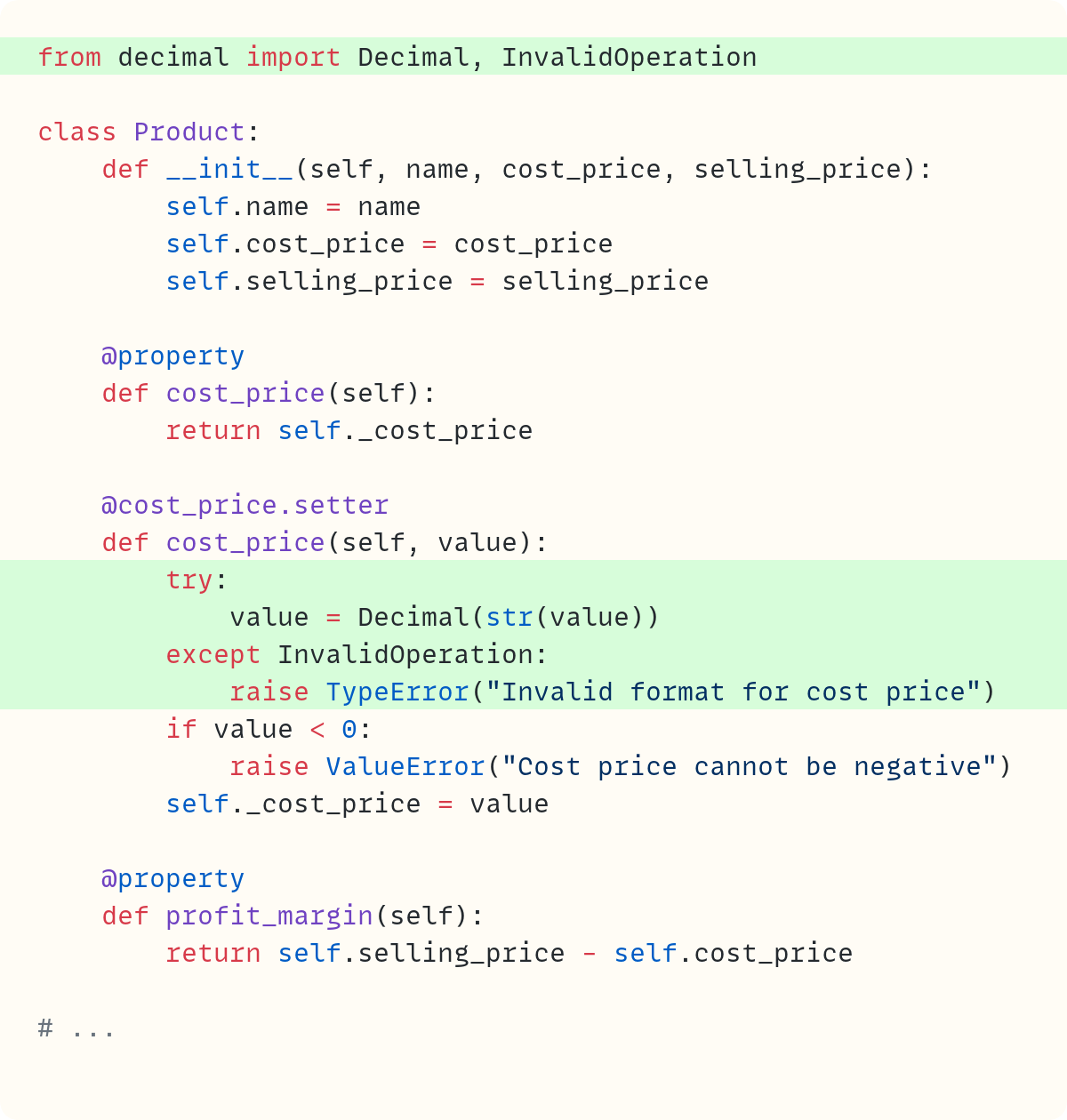
In true duck typing fashion, rather than choosing which data types you’re willing to accept when setting the cost price, you try to convert the input value to Decimal. Any data type that can be converted to Decimal is acceptable. The Decimal type raises an InvalidOperation exception, defined within decimal, when you pass an unacceptable type. So, you use InvalidOperation in the except block.
You probably want to perform the same validation for the selling price, too:
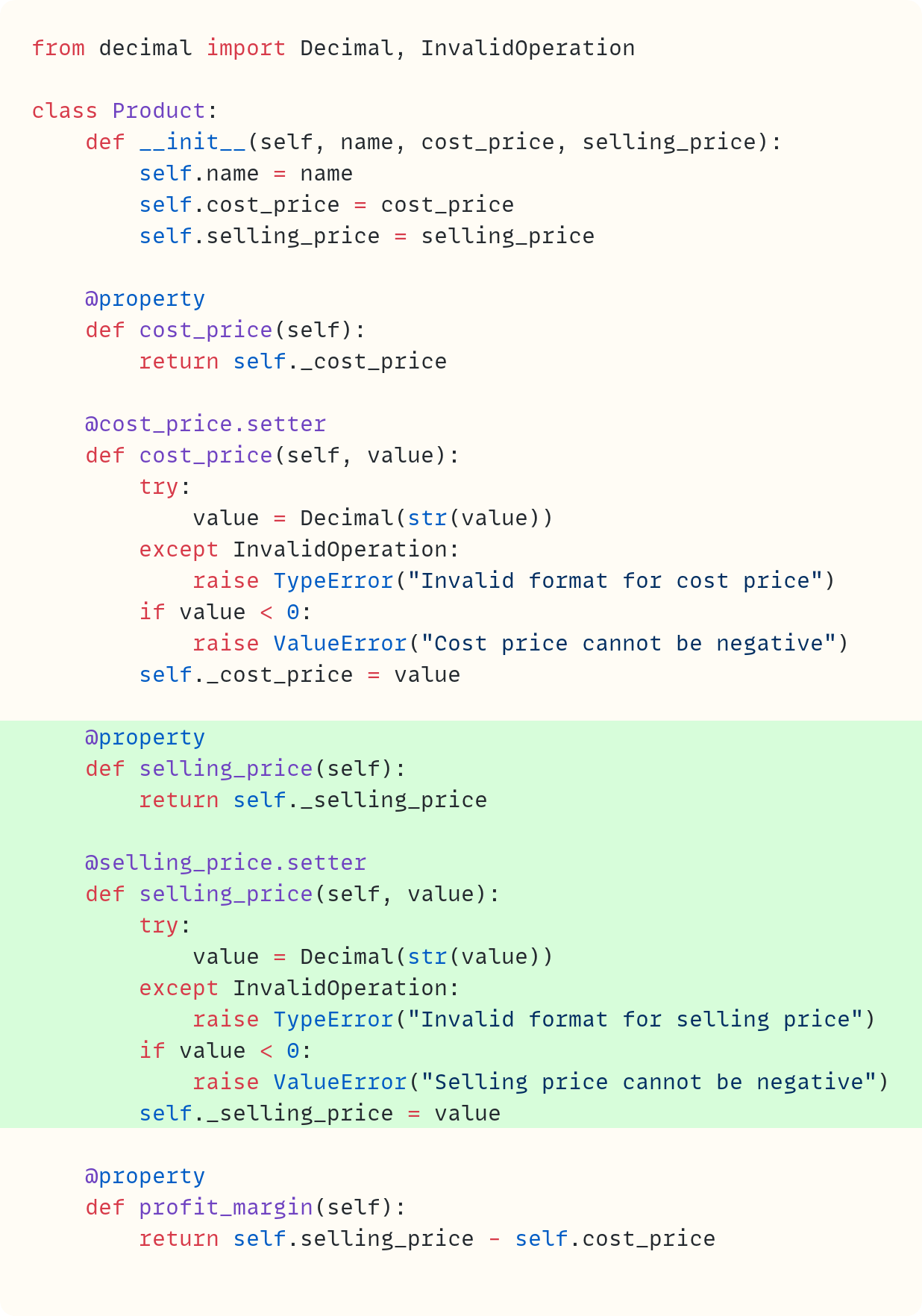
This works. However, there’s a lot of boilerplate code. And the validation is repeated in two setter methods. Sure, you can create a helper function to avoid the repetition. But what if you had more types of prices to include in your class? Perhaps there’s a wholesale_price and a discounted_price, say. You’d have to create properties for each one.
Before I move on from properties, here’s a link to another article I wrote about properties: The Properties of Python’s property .
Now let’s explore a different option.
Descriptors
Spoiler alert: you’ve already been using descriptors. Python’s property uses the descriptor protocol behind the scenes. Indeed, you use descriptors each time you access a method, or when you use the @classmethod and @staticmethod decorators.
But let’s get back to what happens when you use the dot after an object name, such as coffee.cost_price. The quick answer often states that Python looks at the instance’s .__dict__ attribute, which is a dictionary containing the instance’s data attributes. If the attribute is not there, Python looks in the class’s .__dict__ to check whether the attribute is a class attribute.
However, there’s a bit more happening.
The . notation calls the .__getattribute__() special method, which looks for the attribute using a broader set of rules and priorities.
The first thing it looks for is whether the attribute is a descriptor – technically, a data descriptor.
But what’s a descriptor?
Creating a descriptor class
Let’s create one. Create a Price class:
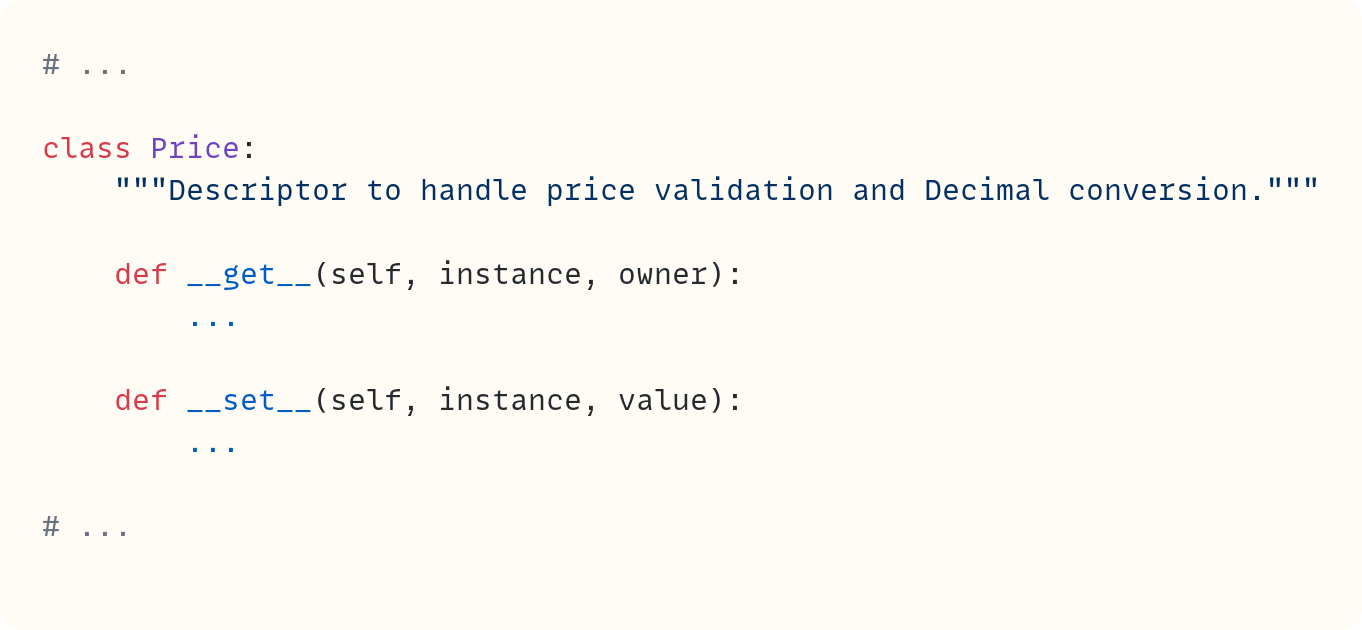
An object that has either of these special methods is a descriptor. (Note that there’s another special method that’s part of the descriptor protocol, .__delete__(), which is also sufficient to create a descriptor. I won’t be discussing .__delete__() in this article.)
So what? This is where descriptors start getting weird – yes, right at the start! Let’s pause with this class and get back to the Product class. Define .cost_price and .selling_price as class attributes and assign instances of the new Price class to them:
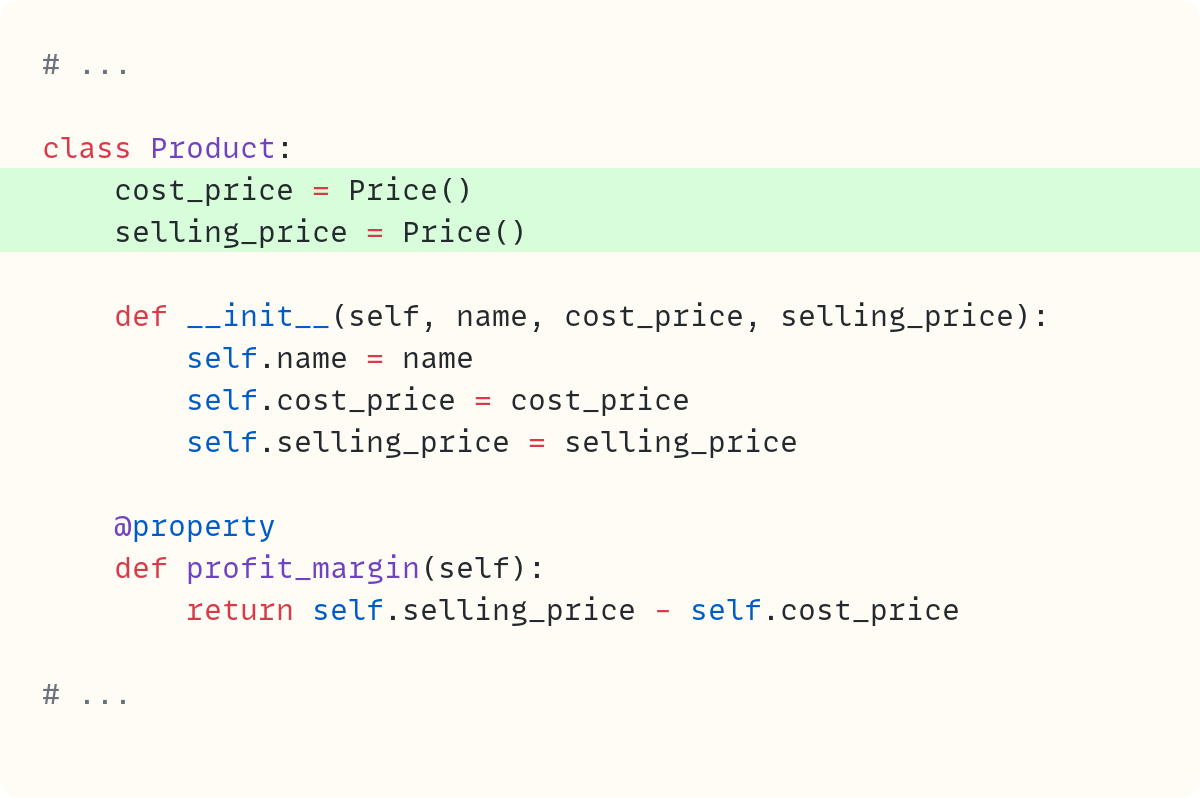
The rest of the code remains the same except that four methods are gone. These are the getter and setter methods you had defined previously to ensure that .cost_price and .selling_price are properties. You no longer need them. You’ll see why soon.
Why define class attributes? Class attributes are created when you define the class, unlike instance attributes, which are created when you create instances. Therefore, the attributes .cost_price and .selling_price exist and are equal to instances of a descriptor class at the time of class definition. This matters, as you’ll also see shortly.
So, what’s special about descriptors? Remember when we discussed how the . triggers the .__getattribute__() special method, which is responsible for looking for the attribute and returning its value? Well, as it happens, Python doesn’t look in the instance’s .__dict__ attribute first, after all.
The first thing it checks is whether the attribute is a descriptor. More specifically, it checks whether the attribute is a data descriptor, which is a descriptor that has .__set__() or .__delete__(). But our descriptor class, Price, has a .__set__(), so this priority applies to a Price object.
Here’s the key to understanding descriptors:
Since
.cost_priceand.selling_priceare descriptors, theProductclass defers to thePriceclass to decide how to get or set a value for this attribute.
Let me repeat that.
Normally, the class that defines an instance determines its behaviour. The special methods in Product determine how a Product instance behaves, such as what its string representations are, whether it’s iterable, whether it has a length, and so on. We haven’t defined any of these special methods in Product, but if we did, they would determine the object’s behaviour in those contexts.
However, when you use the dot on an instance of a Product class, if the attribute you’re accessing is a descriptor, such as .cost_price and .selling_price, it’s Price.__get__() and Price.__set__() that determine what to do when you get or set the values of .cost_price and .selling_price.
Code in the Price class determines what happens when you access an attribute in a Product instance.
And since you define .cost_price and .selling_price as class attributes that contain descriptors – instances of Price – then the descriptor special methods kick in even in Product.__init__() when you write self.cost_price = cost_price and self.selling_price = selling_price.
Do you want to master Python one article at a time? Then don’t miss out on the articles in The Club, which are exclusive to premium subscribers here on The Python Coding Stack
Understanding how descriptors work
Let’s prove this by adding some code to the Price class. This code is here to let us track what’s happening. You’ll write “proper” code later:
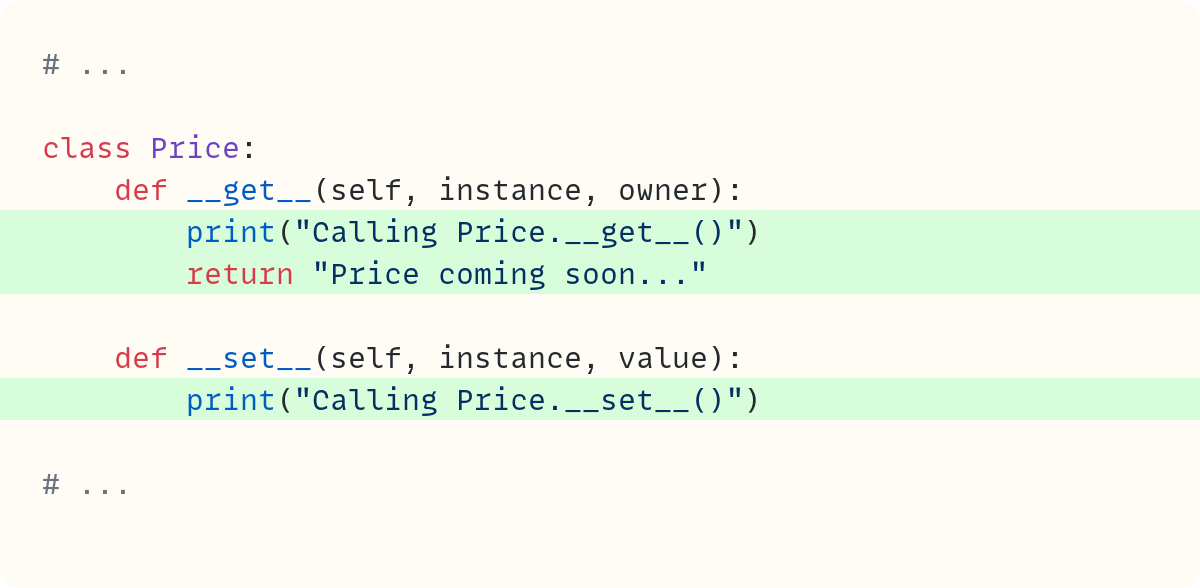
The .__get__() and .__set__() methods print out phrases to allow you to see when these methods are called. The .__get__() special method also returns a string. A reminder that these special methods are defined in the Price class.
Here’s the code so far, which includes a statement in the main scope that creates an instance of the Product class:
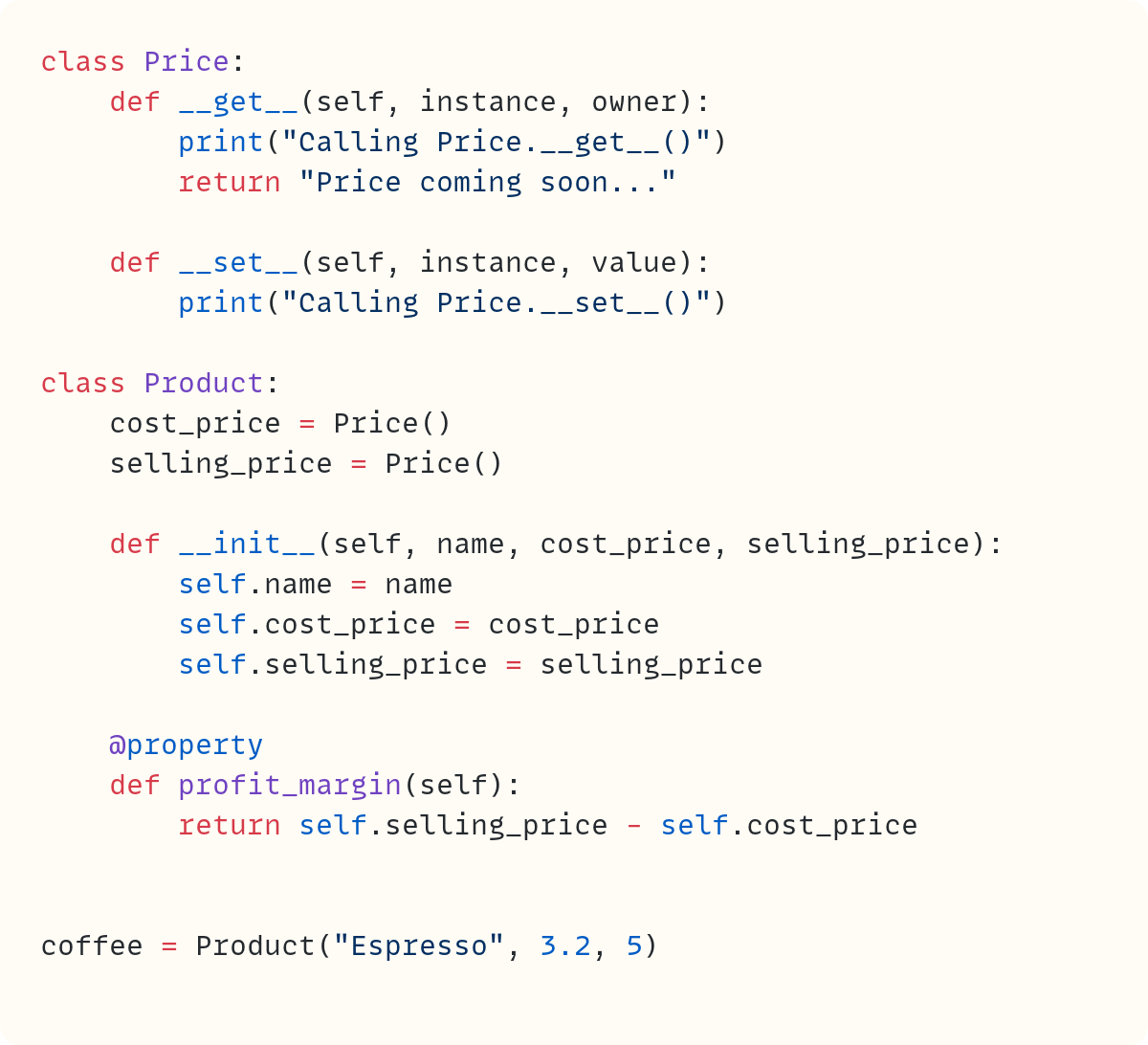
Here’s what you see when you run this code:
Calling Price.__set__()
Calling Price.__set__()
The code calls the Price.__set__() method twice: once when creating self.cost_price and another time when creating self.selling_price in Product.__init__().
Let’s also fetch one of the attributes:

Here’s the output from this code:
Calling Price.__set__()
Calling Price.__set__()
Calling Price.__get__()
Price coming soon...
You still get the two “breadcrumbs” that show that the code called Price.__set__() twice. But now you can also see that the code calls Price.__get__() since you wrote print(coffee.selling_price). And when you access the .selling_price attribute, Python returns the value returned by Price.__get__(), which is the string saying "Price coming soon...".
Therefore, attribute access for .selling_price and .cost_price, which are attributes in Product, is now controlled by the Price class, which is the descriptor class.
Yes, the Price class has taken over control of attribute access in the Product class (but only for the attributes that are descriptors of the Price class, .cost_price and .selling_price.)
Let’s look at the signatures of the .__get__() and .__set__() special methods to figure out how they work. Let’s focus on .__get__() first. Here’s the method’s signature and a few more printouts to help us figure out what’s what:
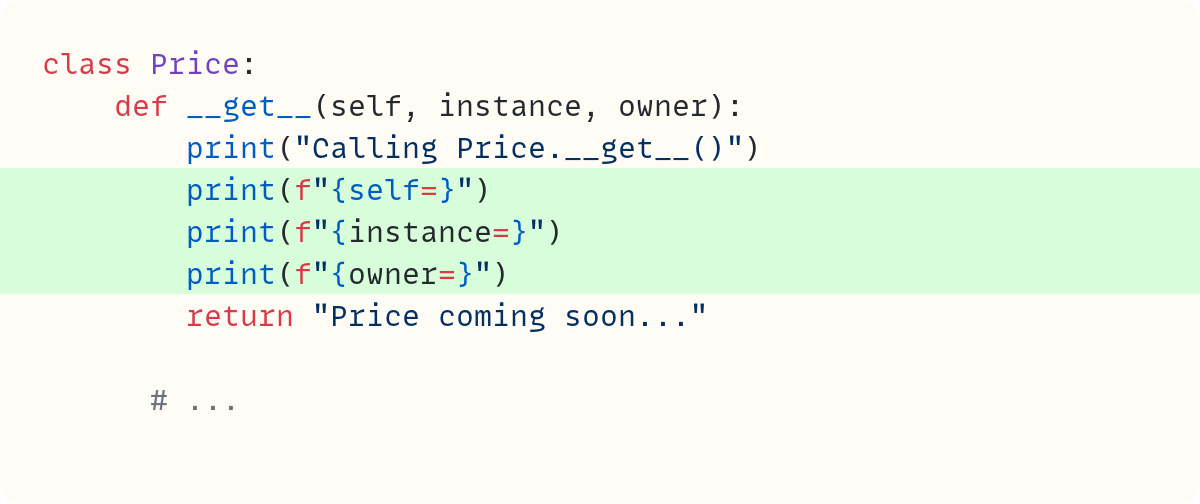
There are three parameters defined in the signature for .__get__(). You won’t be surprised to see self as the first parameter, which is the case for all instance methods in classes. There are also two other parameters named instance and owner. Let’s figure out what they are.
You’ve seen earlier that the current code calls .__get__() once when the code evaluates coffee.selling_price, which you use as an argument for print(). Here’s the output of the code now:
Calling Price.__set__()
Calling Price.__set__()
Calling Price.__get__()
self=<__main__.Price object at 0x100bc8f50>
instance=<__main__.Product object at 0x100bd9160>
owner=<class ‘__main__.Product’>
Price coming soon...
The new additions are the printouts on the fourth, fifth, and sixth lines showing the values assigned to the parameters self, instance, and owner in Price.__get__(). First, a reminder that this method is triggered when you run the following expression:

Here’s what the outputs for the three parameters show:
self=<__main__.Price object ...>: Therefore,selfrefers to the instance of thePriceclass itself, asselfalways does in classes. This is the descriptor instance. It’s the same descriptor object the attributecoffee.selling_priceinvokes (but not the object thatcoffee.selling_pricereturns, as you’ll see soon.)instance=<__main__.Product object ...>: This output shows thatinstanceis an object of typeProduct. It’s the object that has the descriptor as one of its attributes. In this example, this is thecoffeeobject.owner=<__main__.Product>: This is theProductclass itself (not an instance of the class).
Therefore, in the expression coffee.selling_price, coffee is the Product instance and .selling_price is the Price instance, which is the descriptor.
And when Python evaluates the expression coffee.selling_price, it defers the decision of which value to display to the Price class. Python calls Price.__get__() with the following arguments:
The
selling_pricedescriptor is passed toselfThe
coffeeobject, an instance ofProduct, is passed toinstanceThe
Productclass is passed toowner
I’ve repeated myself in the previous few paragraphs, but that’s deliberate. I get confused following the flow from the Product class to calling a method in the descriptor class, Price. I need this repetition. Maybe it helps you, too.
As a side note, which I’ll mostly ignore in this article: It’s possible to call the descriptor using the class rather than an instance, such as the following:

Here’s the output from this code:
Calling Price.__get__()
self=<__main__.Price object at 0x102a79090>
instance=None
owner=<class ‘__main__.Product’>
Price coming soon...
In this case, None is assigned to instance since there’s no Product instance involved.
Let’s look at the .__set__() special method now:
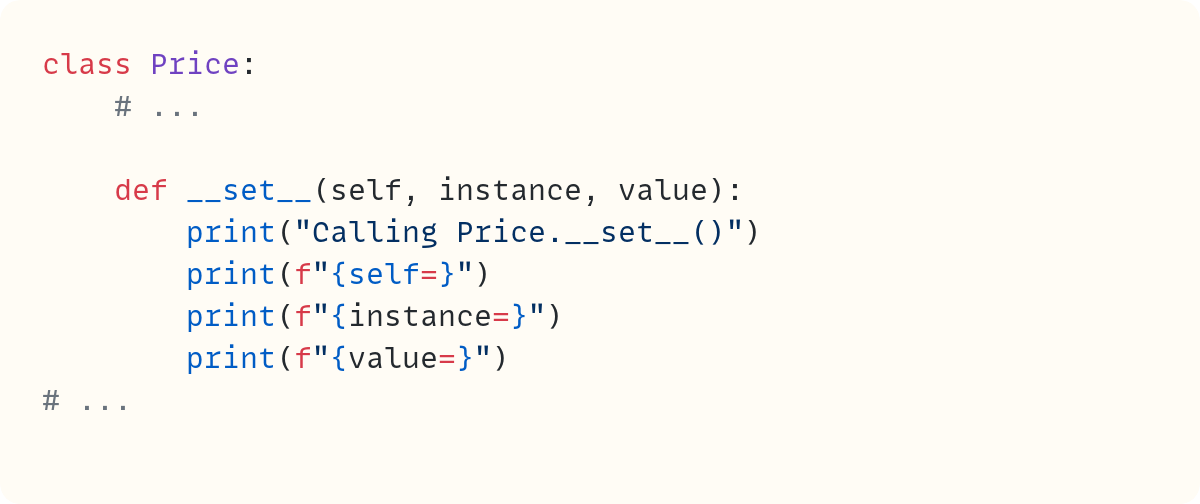
The signature still includes self and instance, and these refer to the same objects as they did in .__get__(). The third parameter is value, which stores the object you want to use when setting the attribute’s value. Let’s focus on creating an instance of Product as you did earlier:

This code accesses descriptors using the dot notation twice within Product.__init__() since it sets the values of .cost_price and .selling_price, which contain Price objects. Here’s the output from this code:
Calling Price.__set__()
self=<__main__.Price object at 0x104cf5010>
instance=<__main__.Product object at 0x104cf5160>
value=3.2

Calling Price.__set__()
self=<__main__.Price object at 0x104ce4f50>
instance=<__main__.Product object at 0x104cf5160>
value=5
The two calls are triggered by two different descriptors, .cost_price and .selling_price. Therefore, self refers to different objects in these calls, as you can see from the different identity values displayed.
However, the descriptors belong to the same instance, the Product object you named coffee. You can see that the printout references the same Product object on both occasions.
The value is the number you’re trying to assign to the descriptors.
Writing the .__get__() and .__set__() methods
Now you know how and when Python calls the .__get__() and .__set__() methods, you can add code within them. You can use the same reasoning you used when creating properties earlier.
To keep track of what’s happening, let’s build the code you need in stages.
First, let’s focus exclusively on the .cost_price attribute. You’ll write the validation as if it’s just for cost price — and you’ll soon see why that breaks once selling price joins the party. You’ll deal with .selling_price later.
You can use the same validation code you used earlier when working with properties. This code should now go in the .__set__() method within the Price class:
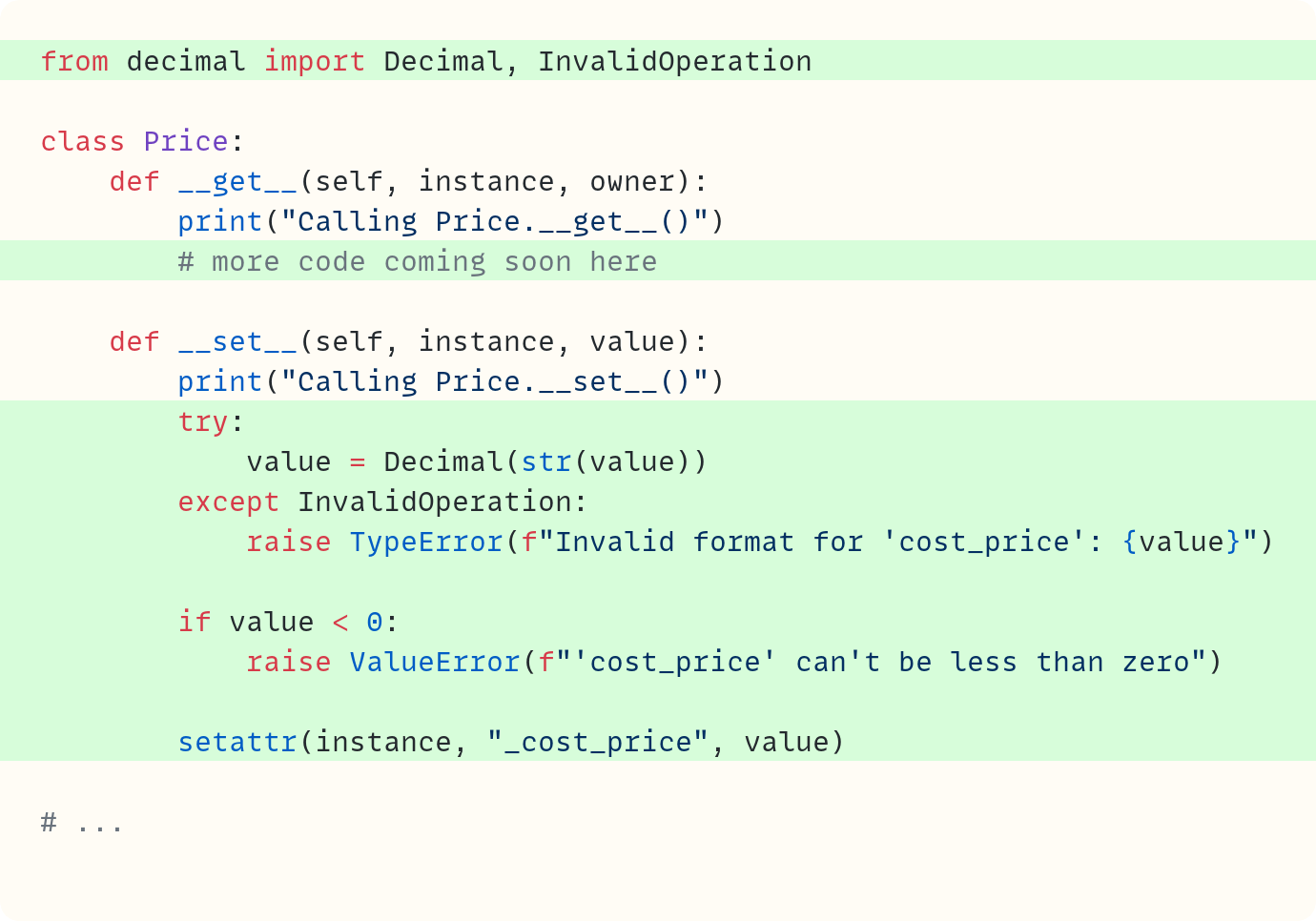
Let’s see what’s new in this version:
I removed most of the
print()calls, which were useful merely to explore what objects are passed to these special methods. I left the ones showing when the code calls these methods for now.The
.__set__()method includes thetry..exceptblock, which ensures the value is aDecimal, and theifstatement, which checks that the value is not negative.The final line in
.__set__()sets the._cost_priceattribute in theinstanceobject, using the value invalue. The function callsetattr(instance, "_cost_price", value)is equivalent toinstance._cost_price = value. In this case,instanceis theProductobject, such ascoffee. There’s a good reason to use thesetattr()built-in function rather than assigning the value directly using the dot notation. You’ll find out later when you also deal with the selling price.
Note that you use the leading underscore in"_cost_price"since you wish to create the non-public attribute._cost_pricerather than assign the value to the.cost_priceattribute (the one without the leading underscore).
Let’s try this out. Note that this code is hard-coded to work only for the .cost_price attribute for now:

Oops! This doesn’t work:
Calling Price.__set__()
Calling Price.__set__()
Calling Price.__get__()
None
The final line shows that the code outputs None. That’s because coffee.cost_price triggers the Price.__get__() method, which you haven’t completed yet! You can still check whether we’re on track by printing the actual data attribute ._cost_price:

You should avoid accessing non-public attributes outside of the class definition in general. But I give you permission to break the rule here since we’re merely exploring what’s happening behind the scenes!
Calling Price.__set__()
Calling Price.__set__()
5
Note how there’s no printout saying "Calling Price.__get__()" now since you’re accessing the data attribute ._cost_price, not the descriptor .cost_price.
But did you notice that this still shows the wrong value? The cost price should be £3.20. It’s the selling price that’s £5.00. Remember how you’re hard-coding the string "_cost_price" in the call to setattr()? This means that when you try to set the selling price, the code currently overwrites the cost price. But don’t worry, we’ll fix this soon.
Time to focus on .__get__(). Since you created the non-public data attribute ._cost_price when setting the value using .__set__(), you can now get the value of that attribute using getattr():
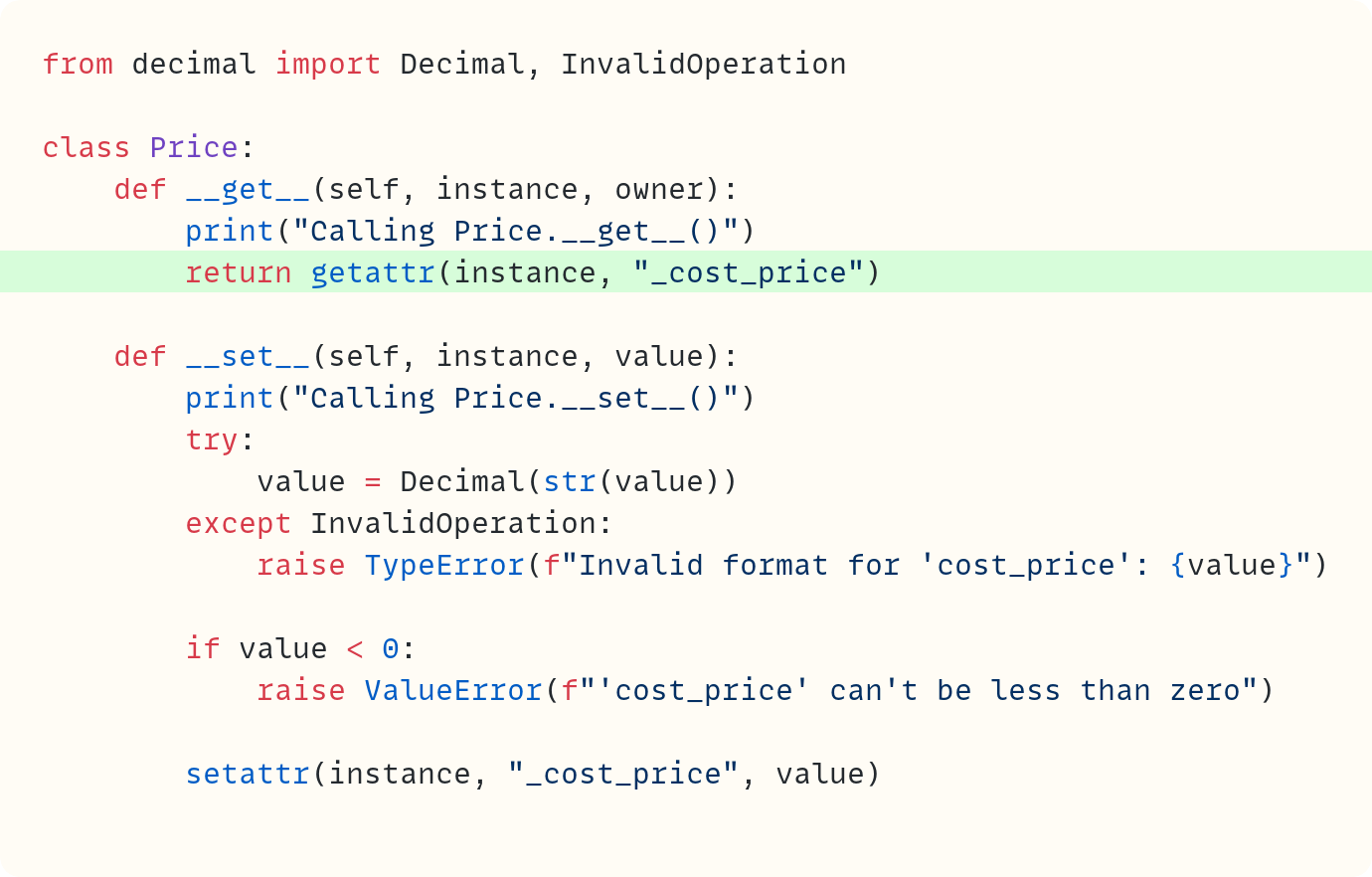
Recall that in .__get__(), the parameter instance refers to the Product instance, such as coffee. Therefore, getattr(instance, "_cost_price") is equivalent to coffee._cost_price in this example.
Let’s try this out, this time using the .cost_price descriptor directly when accessing the value of the cost price:

Here’s the output showing all the breadcrumbs confirming that two attributes are set and that you fetch the value of one of them once. The output also shows the value of the attribute, which is still wrong since £5 is the selling price:
Calling Price.__set__()
Calling Price.__set__()
Calling Price.__get__()
5
We’ll soon stop the selling price from overwriting the cost price.
But first, let’s check that the validation logic works:

This raises an error:
Traceback (most recent call last):
  ... in <module>
    coffee = Product(”Espresso”, -3.2, 5)
  ... in Product.__init__
    self.cost_price = cost_price
    ^^^^^^^^^^^^^^^
  ... in Price.__set__
    raise ValueError(f”’cost_price’ can’t be less than zero”)

ValueError: ‘cost_price’ can’t be less than zero
And so does this:

This time, the error message is different:
...
TypeError: Invalid format for ‘cost_price’: three point two
Another minor note for completeness’s sake. We mentioned that you can call the descriptor through the class, such as Product.cost_price. Since instance is None in this case, the code in .__get__() raises an error since None doesn’t have a ._cost_price attribute (or any attribute, for that matter!) To account for this, you can add the following code in .__get__():
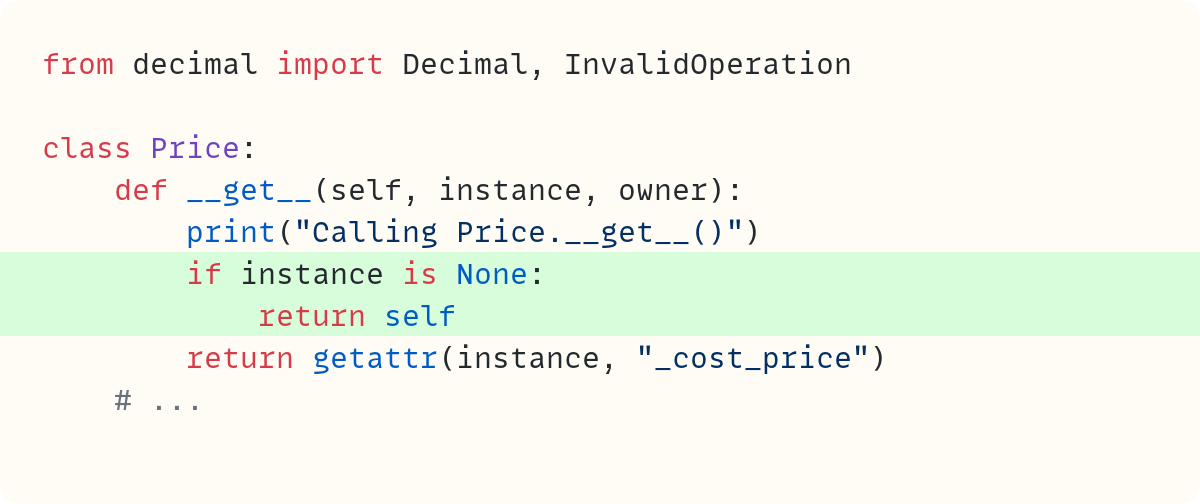
If you call the descriptor from a class, you just get the descriptor back. There’s no instance, so there’s no value to fetch in this case! But let’s move on…
Your call…
The Python Coding Place offers something for everyone:
• a super-personalised one-to-one 6-month mentoring option
$ 4,750
• individual one-to-one sessions
$ 125
• a self-led route with access to 60+ hrs of exceptional video courses and a support forum
$ 400
Which The Python Coding Place student are you?
Making a general descriptor class
This works. But it only works for the .cost_price attribute since there are a few references to this attribute hard-coded in the .__get__() and .__set__() methods:
You use the string
"_cost_price"when callinggetattr()andsetattr().You also refer to the attribute name
'cost_price'in the error messages.
Hard-coding the cost price attribute names also has the undesirable effect of overwriting the cost price with the selling price!
Ideally, you’d like to access the public attribute name "cost_price" (the name of the descriptor) and the non-public data attribute name "_cost_price" dynamically. Recall that these are attributes in the Product class. Python passes the descriptor object self to the .__get__ and .__set__() methods, but not its attribute name within Product.
But descriptors can also deal with this problem. A descriptor allows you to pass the attribute name from the Product class to the Price class using .__set_name__() in the descriptor class:
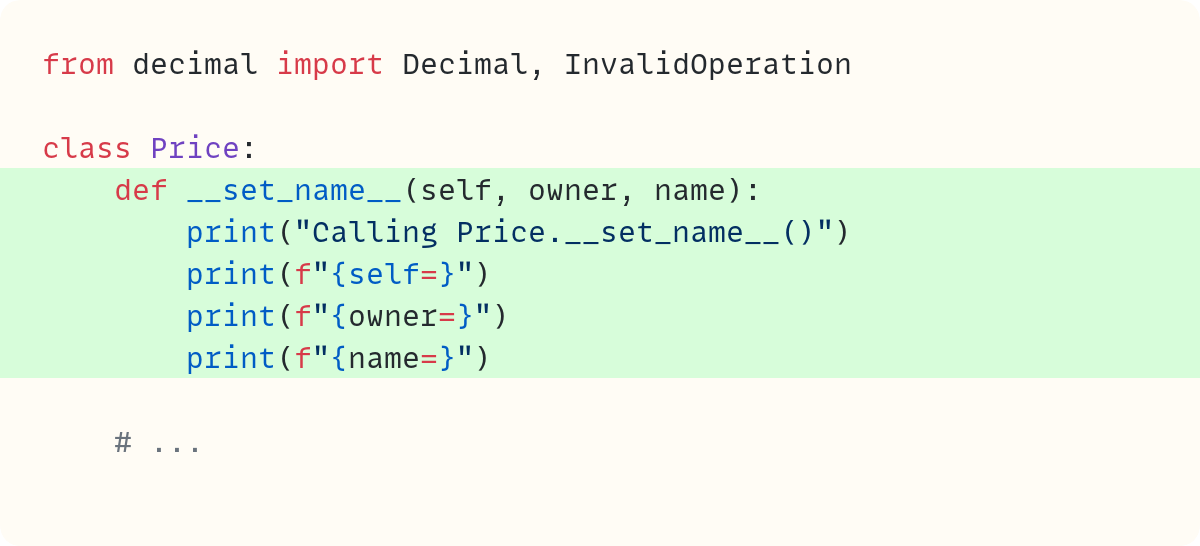
I’ve put similar print() calls to the ones you used earlier to help us identify what’s what. Remove the code that creates the instance coffee, so that your module only defines the two classes, Price and Product, and nothing else. Run your script, and you’ll see this output:
Calling Price.__set_name__()
self=<__main__.Price object at 0x101bbcec0>
owner=<class ‘__main__.Product’>
name=’cost_price’

Calling Price.__set_name__()
self=<__main__.Price object at 0x101bacf50>
owner=<class ‘__main__.Product’>
name=’selling_price’
Python calls Price.__set_name__ when you create the descriptors within Product. Recall that you create the descriptors when you assign them to the class attributes. These attributes, and therefore the descriptors, are created when you define the Product class and not when you create Product instances.
As before, self refers to the descriptor object itself. The owner parameter still refers to the class in which the descriptors are defined, Product in this example.
Finally, name is a string containing the attribute name you use within the Product class. Therefore, name is either "cost_price" or "selling_price".
You can now use this name within code in the Price class. First, let’s tidy up the .__set_name__() method:
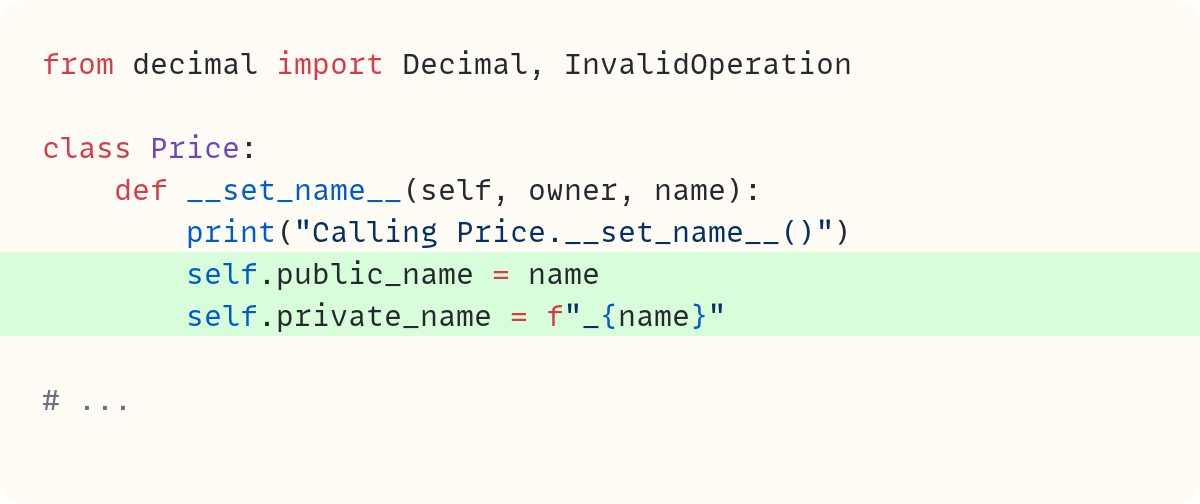
You create two instance attributes in the Price object to refer to the private and public names. You may recall that I mentioned Python prefers the term “non-public” over “private”. However, the Python documentation also occasionally uses the term “private”, including when discussing descriptors. It’s common to see .private_name used as the instance attribute within a descriptor. I’ll acquiesce.
Now, you can update the rest of the code:
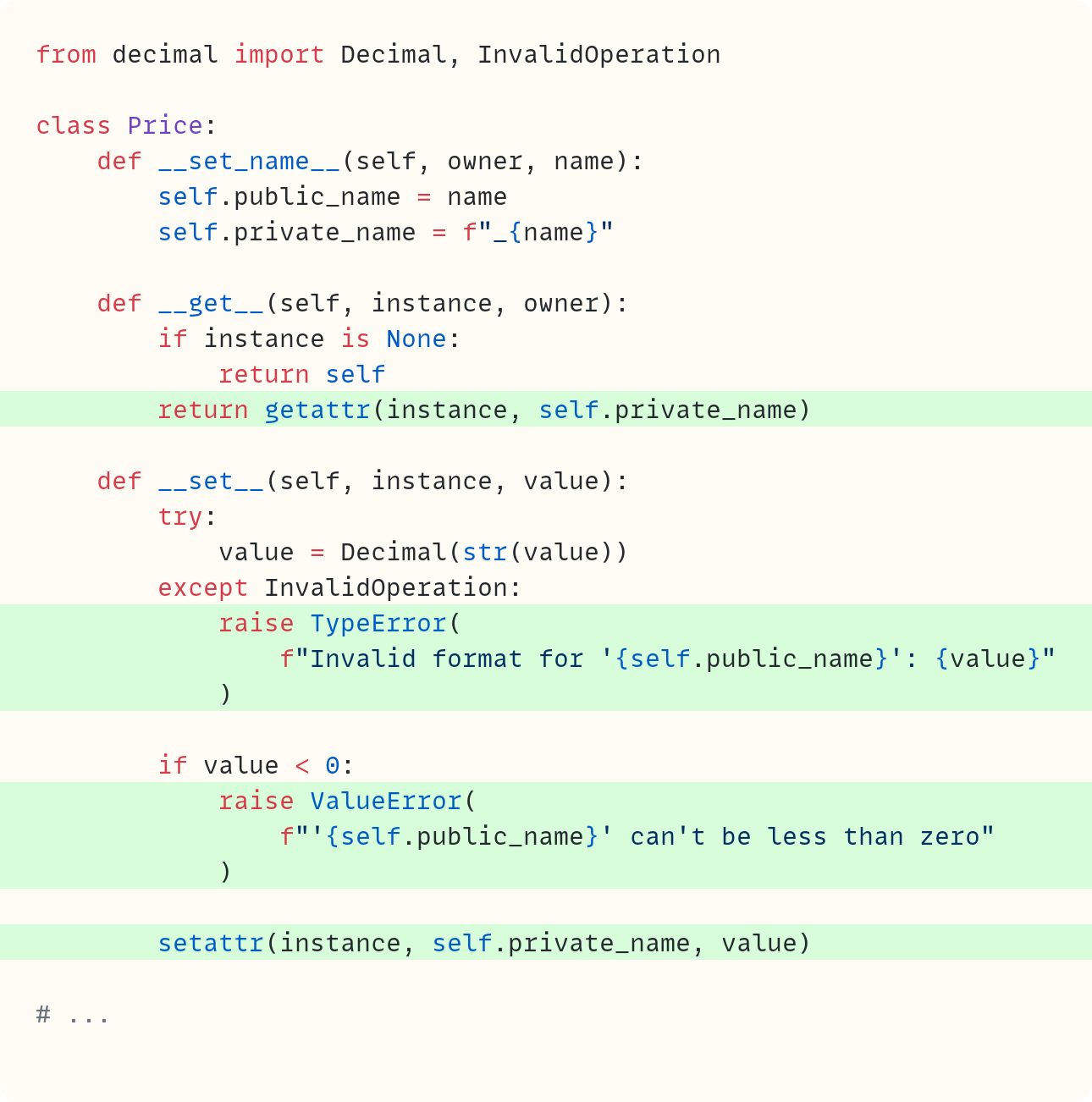
You use self.private_name as an argument in getattr() and setattr() instead of the hard-coded string you had before. And you use self.public_name in the error messages. Note that I’ve also removed the breadcrumb calls to print() since we no longer need to show when Python calls each of these methods.
Let’s test:
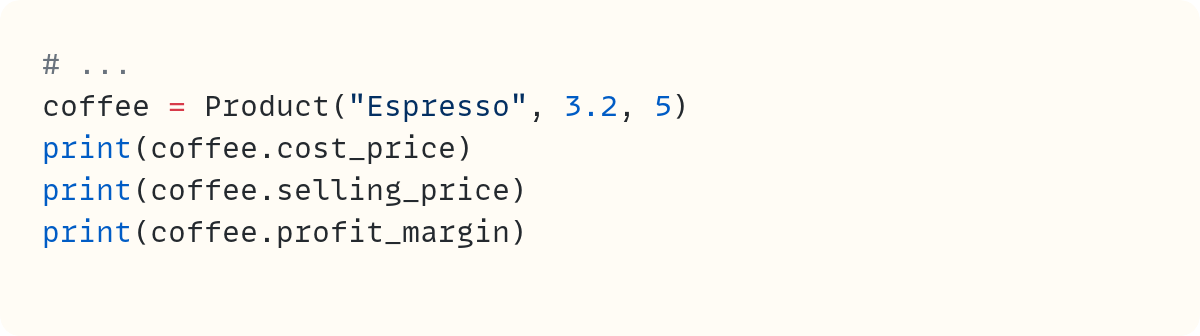
You can set and get values, including within the .profit_margin property:
3.2
5
1.8
But you can’t set invalid values. Try coffee.cost_price = -2 and coffee.cost_price = "three point two" to confirm the validation code works.
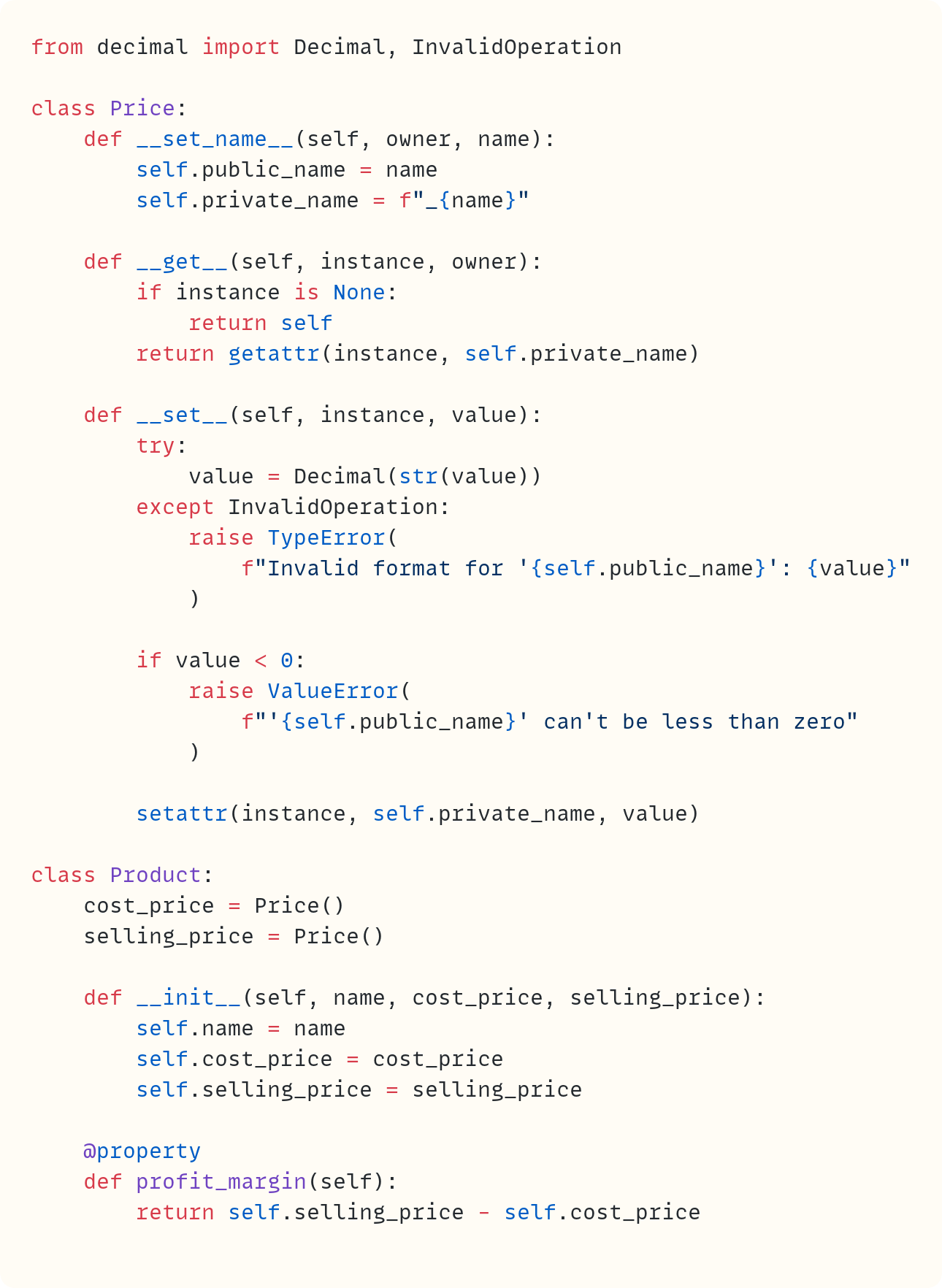
Here’s the full code containing both classes:
How About Properties, Then?
You use a property for the .profit_margin attribute in Product. This is a simple read-only attribute you use to calculate the value each time you need the attribute. You could use properties for .selling_price and .cost_price, but there’s plenty of boilerplate code needed for each attribute. Annoying, especially if you need many price-related attributes in your class, not just cost and selling prices.
Descriptors allow you to put the validation logic into a separate class. And descriptors aren’t restricted to data validation. You can use descriptors whenever you need to execute any logic each time you get or set the value of an attribute. And you can use the Price descriptor elsewhere, too. It’s not restricted to the Product class.
But remember the property object? This is itself a descriptor. Here’s evidence of this:

This code returns True. The .profit_margin attribute is a property. It has the .__get__() special method, which is sufficient to make it a descriptor. A property is a descriptor.
Note that you’re accessing this property through the class name within hasattr(). Remember the code checking whether instance is None in .__get__()? You used the if instance is None: check to return the descriptor itself when you call the descriptor from a class. That’s why you can introspect the descriptor through Product.profit_margin. But don’t worry too much about this detail!
Final Words
How often have you used a method, such as in this case?

Millions of times, you say? You may already be aware that this call to the .append() method is similar to this more verbose version:

In this version, you use append() as a function. It’s a function that’s an attribute of the list class. Therefore, you pass the object as its first argument – this is the object that is assigned to the first parameter self in the append() signature.
Well, as it happens, Python uses the descriptor protocol to automatically equate numbers.append(30) to the function call list.append(numbers, 30).
Functions are objects. And function objects are descriptors in Python. When you access them through an instance of a class, such as in numbers.append(30), Python goes through the function’s .__get__() method and calls list.append(numbers, 30) so that you don’t have to worry about it:
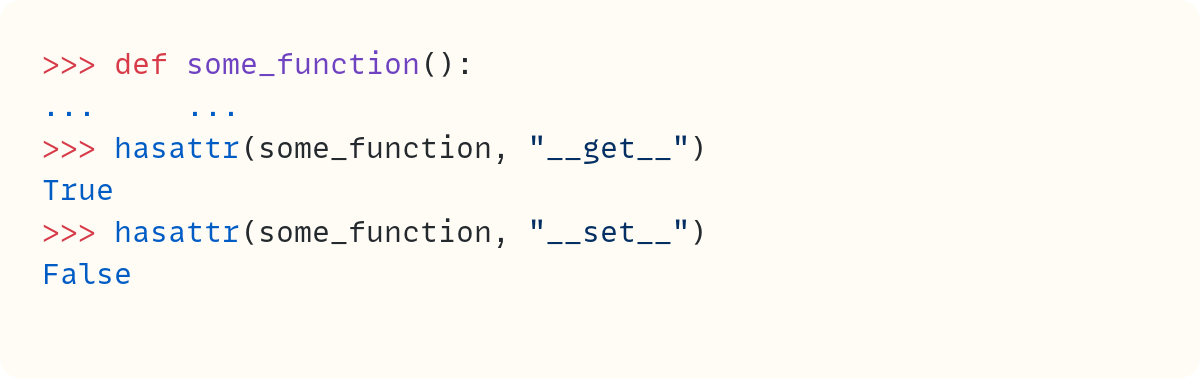
Functions have a .__get__() method, which makes them descriptors. Since you can’t set the value for a function object, they don’t have a .__set__() method. Descriptors that only have a .__get__() special method, such as functions, are non-data descriptors. Non-data descriptors don’t get the same precedence as data descriptors when Python is figuring out what to do when you use the dot notation. But that’s a topic for another day…
As with many topics, learning about descriptors helps you learn about descriptors (duh!), but it also helps you understand Python better.
So, descriptors are a useful tool whenever you want to perform additional tasks, such as validation, whenever you get or set the value of an attribute. What makes them a bit weird until you get used to them is that the logic is defined in the descriptor class itself. The benefit of this is that you can use descriptors across many classes and rely on the same logic, without having to define that logic in each class.
For example, you can use Price() objects, which are descriptors, in any class where you need to use prices and apply the same validation you defined in this article. And you can add functions to any class safe in the knowledge that the descriptor protocol will ensure they’re treated as instance methods when they’re accessed (unless you use the @classmethod or @staticmethod decorators, which – you guessed it – also use the descriptor protocol to perform their magic.)
In summary, a descriptor is an object that hijacks the attribute access process triggered by the dot notation. Normally, when you access an attribute of an object, the object’s class deals with finding the value. However, when the attribute is a descriptor, the descriptor class takes over.
Did you enjoy this article? Did you understand how descriptors work? That’s not an easy feat!
Do you want to become a premium subscriber and join The Club to help support this publication and ensure there are more articles like this one?

Code in this article uses Python 3.14
The code images used in this article are created using Snappify. [Affiliate link]
For more Python resources, you can also visit Real Python—you may even stumble on one of my own articles or courses there!
Also, are you interested in technical writing? You’d like to make your own writing more narrative, more engaging, more memorable? Have a look at Breaking the Rules.
And you can find out more about me at stephengruppetta.com
Further reading related to this article’s topic:
The Properties of Python’s
property
Appendix: Code Blocks
Code Block #1
class Product:
    def __init__(self, name, cost_price, selling_price):
        self.name = name
        self.cost_price = cost_price
        self.selling_price = selling_price
        self.profit_margin = self.selling_price - self.cost_price
Code Block #2
# ...
coffee = Product("Espresso", 2.5, 4.5)
print(f"{coffee.profit_margin=}")
Code Block #3
# ...
coffee = Product("Espresso", 2.5, 4.5)
coffee.selling_price = 5.5
print(f"{coffee.profit_margin=}")
Code Block #4
class Product:
    def __init__(self, name, cost_price, selling_price):
        self.name = name
        self.cost_price = cost_price
        self.selling_price = selling_price

    @property
    def profit_margin(self):
        return self.selling_price - self.cost_price

coffee = Product("Espresso", 2.5, 4.5)
coffee.selling_price = 5.5
print(f"{coffee.profit_margin=}")
Code Block #5
# ...
coffee.profit_margin = 4
Code Block #6
class Product:
    def __init__(self, name, cost_price, selling_price):
        self.name = name
        if cost_price < 0:
            raise ValueError("Cost price cannot be negative")
        self.cost_price = cost_price
        self.selling_price = selling_price

    @property
    def profit_margin(self):
        return self.selling_price - self.cost_price

# ...
Code Block #7
# ...
coffee = Product("Espresso", -2.5, 4.5)
Code Block #8
# ...
coffee = Product("Espresso", 2.5, 4.5)  # Back to correct cost price
coffee.cost_price = -1
print(f"{coffee.cost_price=}")
Code Block #9
class Product:
    def __init__(self, name, cost_price, selling_price):
        self.name = name
        self.selling_price = selling_price

    @property
    def cost_price(self):
        # ???
        ...

    @property
    def profit_margin(self):
        return self.selling_price - self.cost_price

# ...
Code Block #10
class Product:
    def __init__(self, name, cost_price, selling_price):
        self.name = name
        self._cost_price = cost_price
        self.selling_price = selling_price

    @property
    def cost_price(self):
        return self._cost_price

    @property
    def profit_margin(self):
        return self.selling_price - self.cost_price

# ...
Code Block #11
# ...
coffee = Product("Espresso", 2.5, 4.5)
print(f"{coffee.cost_price=}")
Code Block #12
# ...
coffee = Product("Espresso", 2.5, 4.5)
coffee.cost_price = 3
print(f"{coffee.cost_price=}")
Code Block #13
class Product:
    def __init__(self, name, cost_price, selling_price):
        self.name = name
        self._cost_price = cost_price
        self.selling_price = selling_price

    @property
    def cost_price(self):
        return self._cost_price

    @cost_price.setter
    def cost_price(self, value):
        if value < 0:
            raise ValueError("Cost price cannot be negative")
        self._cost_price = value

    @property
    def profit_margin(self):
        return self.selling_price - self.cost_price

coffee = Product("Espresso", 2.5, 4.5)
coffee.cost_price = 3
print(f"{coffee.cost_price=}")
Code Block #14
# ...
coffee = Product("Espresso", 2.5, 4.5)
coffee.cost_price = -3
print(f"{coffee.cost_price=}")
Code Block #15
# ...
coffee = Product("Espresso", -2.5, 4.5)
print(f"{coffee.cost_price=}")
Code Block #16
class Product:
    def __init__(self, name, cost_price, selling_price):
        self.name = name
        self.cost_price = cost_price
        self.selling_price = selling_price

    @property
    def cost_price(self):
        return self._cost_price

    @cost_price.setter
    def cost_price(self, value):
        if value < 0:
            raise ValueError("Cost price cannot be negative")
        self._cost_price = value

    @property
    def profit_margin(self):
        return self.selling_price - self.cost_price

# ...
Code Block #17
0.1 + 0.2
# 0.30000000000000004
Code Block #18
from decimal import Decimal
Decimal("0.1") + Decimal("0.2")
# Decimal('0.3')
Code Block #19
from decimal import Decimal, InvalidOperation

class Product:
    def __init__(self, name, cost_price, selling_price):
        self.name = name
        self.cost_price = cost_price
        self.selling_price = selling_price

    @property
    def cost_price(self):
        return self._cost_price

    @cost_price.setter
    def cost_price(self, value):
        try:
            value = Decimal(str(value))
        except InvalidOperation:
            raise TypeError("Invalid format for cost price")
        if value < 0:
            raise ValueError("Cost price cannot be negative")
        self._cost_price = value

    @property
    def profit_margin(self):
        return self.selling_price - self.cost_price

# ...
Code Block #20
from decimal import Decimal, InvalidOperation

class Product:
    def __init__(self, name, cost_price, selling_price):
        self.name = name
        self.cost_price = cost_price
        self.selling_price = selling_price

    @property
    def cost_price(self):
        return self._cost_price

    @cost_price.setter
    def cost_price(self, value):
        try:
            value = Decimal(str(value))
        except InvalidOperation:
            raise TypeError("Invalid format for cost price")
        if value < 0:
            raise ValueError("Cost price cannot be negative")
        self._cost_price = value

    @property
    def selling_price(self):
        return self._selling_price

    @selling_price.setter
    def selling_price(self, value):
        try:
            value = Decimal(str(value))
        except InvalidOperation:
            raise TypeError("Invalid format for selling price")
        if value < 0:
            raise ValueError("Selling price cannot be negative")
        self._selling_price = value

    @property
    def profit_margin(self):
        return self.selling_price - self.cost_price
Code Block #21
# ...

class Price:
    """Descriptor to handle price validation and Decimal conversion."""

    def __get__(self, instance, owner):
        ...

    def __set__(self, instance, value):
        ...

# ...
Code Block #22
# ...

class Product:
    cost_price = Price()
    selling_price = Price()

    def __init__(self, name, cost_price, selling_price):
        self.name = name
        self.cost_price = cost_price
        self.selling_price = selling_price

    @property
    def profit_margin(self):
        return self.selling_price - self.cost_price

# ...
Code Block #23
# ...

class Price:
    def __get__(self, instance, owner):
        print("Calling Price.__get__()")
        return "Price coming soon..."

    def __set__(self, instance, value):
        print("Calling Price.__set__()")

# ...
Code Block #24
class Price:
    def __get__(self, instance, owner):
        print("Calling Price.__get__()")
        return "Price coming soon..."

    def __set__(self, instance, value):
        print("Calling Price.__set__()")

class Product:
    cost_price = Price()
    selling_price = Price()

    def __init__(self, name, cost_price, selling_price):
        self.name = name
        self.cost_price = cost_price
        self.selling_price = selling_price

    @property
    def profit_margin(self):
        return self.selling_price - self.cost_price


coffee = Product("Espresso", 3.2, 5)
Code Block #25
# ...
coffee = Product("Espresso", 3.2, 5)
print(coffee.selling_price)
Code Block #26
class Price:
    def __get__(self, instance, owner):
        print("Calling Price.__get__()")
        print(f"{self=}")
        print(f"{instance=}")
        print(f"{owner=}")
        return "Price coming soon..."

      # ...
Code Block #27
coffee.selling_price
Code Block #28
# ...
print(Product.selling_price)
Code Block #29
class Price:
    # ...

    def __set__(self, instance, value):
        print("Calling Price.__set__()")
        print(f"{self=}")
        print(f"{instance=}")
        print(f"{value=}")
# ...
Code Block #30
# ...
coffee = Product("Espresso", 3.2, 5)
Code Block #31
from decimal import Decimal, InvalidOperation

class Price:
    def __get__(self, instance, owner):
        print("Calling Price.__get__()")
        # more code coming soon here

    def __set__(self, instance, value):
        print("Calling Price.__set__()")
        try:
            value = Decimal(str(value))
        except InvalidOperation:
            raise TypeError(f"Invalid format for 'cost_price': {value}")

        if value < 0:
            raise ValueError(f"'cost_price' can't be less than zero")

        setattr(instance, "_cost_price", value)

# ...
Code Block #32
# ...

coffee = Product("Espresso", 3.2, 5)
print(coffee.cost_price)
Code Block #33
# ...

coffee = Product("Espresso", 3.2, 5)
print(coffee._cost_price)
Code Block #34
from decimal import Decimal, InvalidOperation

class Price:
    def __get__(self, instance, owner):
        print("Calling Price.__get__()")
        return getattr(instance, "_cost_price")

    def __set__(self, instance, value):
        print("Calling Price.__set__()")
        try:
            value = Decimal(str(value))
        except InvalidOperation:
            raise TypeError(f"Invalid format for 'cost_price': {value}")

        if value < 0:
            raise ValueError(f"'cost_price' can't be less than zero")

        setattr(instance, "_cost_price", value)
Code Block #35
# ...

coffee = Product("Espresso", 3.2, 5)
print(coffee.cost_price)
Code Block #36
# ...

coffee = Product("Espresso", -3.2, 5)
Code Block #37
# ...
coffee = Product("Espresso", "three point two", 5)
Code Block #38
from decimal import Decimal, InvalidOperation

class Price:
    def __get__(self, instance, owner):
        print("Calling Price.__get__()")
        if instance is None:
            return self
        return getattr(instance, "_cost_price")
    # ...
Code Block #39
from decimal import Decimal, InvalidOperation

class Price:
    def __set_name__(self, owner, name):
        print("Calling Price.__set_name__()")
        print(f"{self=}")
        print(f"{owner=}")
        print(f"{name=}")

		# ...
Code Block #40
from decimal import Decimal, InvalidOperation

class Price:
    def __set_name__(self, owner, name):
        print("Calling Price.__set_name__()")
        self.public_name = name
        self.private_name = f"_{name}"

# ...
Code Block #41
from decimal import Decimal, InvalidOperation

class Price:
    def __set_name__(self, owner, name):
        self.public_name = name
        self.private_name = f"_{name}"

    def __get__(self, instance, owner):
        if instance is None:
            return self
        return getattr(instance, self.private_name)

    def __set__(self, instance, value):
        try:
            value = Decimal(str(value))
        except InvalidOperation:
            raise TypeError(
                f"Invalid format for '{self.public_name}': {value}"
            )

        if value < 0:
            raise ValueError(
                f"'{self.public_name}' can't be less than zero"
            )

        setattr(instance, self.private_name, value)

# ...
Code Block #42
# ...
coffee = Product("Espresso", 3.2, 5)
print(coffee.cost_price)
print(coffee.selling_price)
print(coffee.profit_margin)
Code Block #43
from decimal import Decimal, InvalidOperation

class Price:
    def __set_name__(self, owner, name):
        self.public_name = name
        self.private_name = f"_{name}"

    def __get__(self, instance, owner):
        if instance is None:
            return self
        return getattr(instance, self.private_name)

    def __set__(self, instance, value):
        try:
            value = Decimal(str(value))
        except InvalidOperation:
            raise TypeError(
                f"Invalid format for '{self.public_name}': {value}"
            )

        if value < 0:
            raise ValueError(
                f"'{self.public_name}' can't be less than zero"
            )

        setattr(instance, self.private_name, value)

class Product:
    cost_price = Price()
    selling_price = Price()

    def __init__(self, name, cost_price, selling_price):
        self.name = name
        self.cost_price = cost_price
        self.selling_price = selling_price

    @property
    def profit_margin(self):
        return self.selling_price - self.cost_price
Code Block #44
# ...
print(hasattr(Product.profit_margin, "__get__"))
Code Block #45
numbers = [10, 20]
numbers.append(30)
numbers
# [10, 20, 30]
Code Block #46
numbers = [10, 20]
list.append(numbers, 30)
numbers
# [10, 20, 30]
Code Block #47
def some_function():
    ...
hasattr(some_function, "__get__")
# True
hasattr(some_function, "__set__")
# False
Join The Club, the exclusive area for paid subscribers for more Python posts, videos, a members’ forum, and more.
You can also support this publication by making a one-off contribution of any amount you wish.
For more Python resources, you can also visit Real Python—you may even stumble on one of my own articles or courses there!
Also, are you interested in technical writing? You’d like to make your own writing more narrative, more engaging, more memorable? Have a look at Breaking the Rules.
And you can find out more about me at stephengruppetta.com