


When you decide to learn about Python’s special methods, you have to choose which ones to learn first. Some are more straightforward than others. It makes sense to prioritise them.
However, there are some headaches and rabbit holes along the way.
And one of these challenges is when you start exploring the “get*” dunder methods. You come across .__getitem__(), .__getattr__(), .__getattribute__(), and .__get__() and you think:
“Aren’t they all the same thing? They’re all ‘getting’ stuff, right?”
Well, yes, they’re all “getting stuff”, which is why they have “get” in their names. But, as you probably guessed by now, they do different things.
One Deals With [] • The Others Deal With .
Let’s start with the odd one out, which is also possibly the least challenging of the lot. The .__getitem__() special method deals with the square bracket notation, [], which you place after an object’s name. These are the square brackets you use to get an item from a list or a dictionary, say. You’ll see later that the other special methods with “get” in their name deal with the dot, ., which you use in a different context in Python.
With lists, or any other sequence, you use the square brackets with an index that represents the position of an item within the data structure. So, numbers[0] gives you the value of the first item in numbers if numbers is a sequence.
With dictionaries, or mappings in general, you place the key inside the square brackets to fetch the value associated with that key, such as points["Sam"], which gives the value associated with the key "Sam" if it exists.
Let’s explore a custom class:
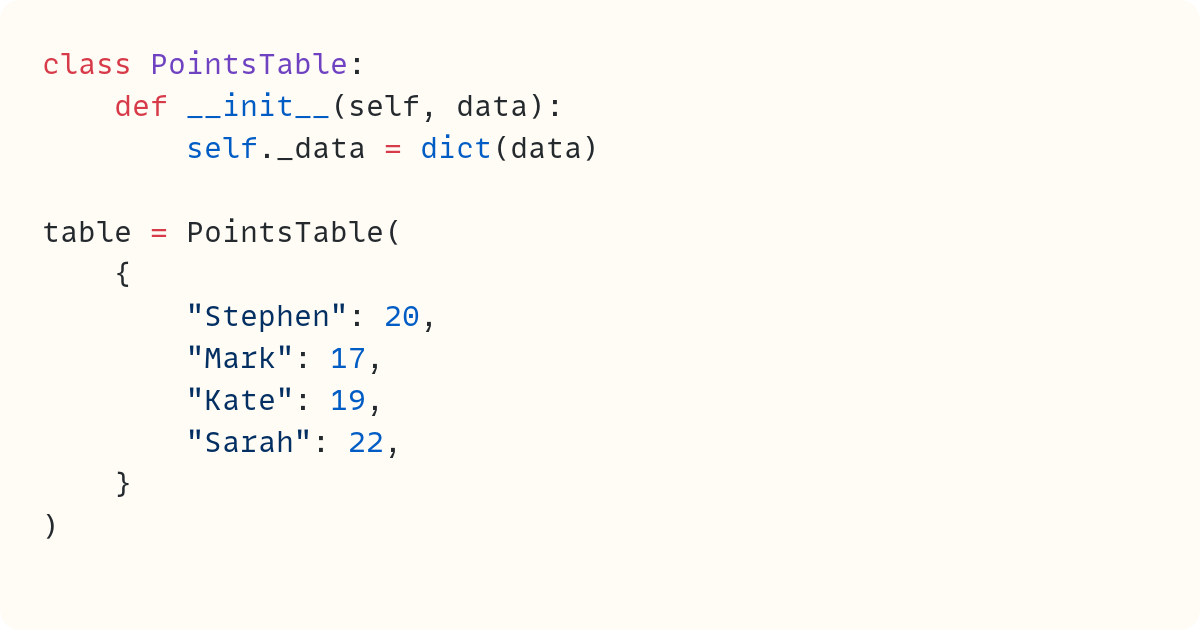
You pass a mapping to PointsTable when creating an instance of the class. The data is stored as a dictionary in the ._data attribute.
Now, let’s say you’d like to access points from a PointsTable instance using the square bracket notation, as you would do with a dictionary:

Unfortunately, this doesn’t work:
Traceback (most recent call last):
  ...
    print(table[”Mark”])
          ~~~~~^^^^^^^^
TypeError: ‘PointsTable’ object is not subscriptable
The PointsTable instance is not a dictionary. It includes a dictionary as a data attribute. The PointsTable object itself is not subscriptable, which means you can’t use the square bracket notation to fetch an item.
When Python sees the square bracket notation after an object identifier, such as table, it calls the class’s .__getitem__() special method. If it’s not there, as in this case, Python raises a TypeError saying the object is not subscriptable.
But what does this tell you? If you want to use the square brackets notation, you just need to define .__getitem__() in the class:
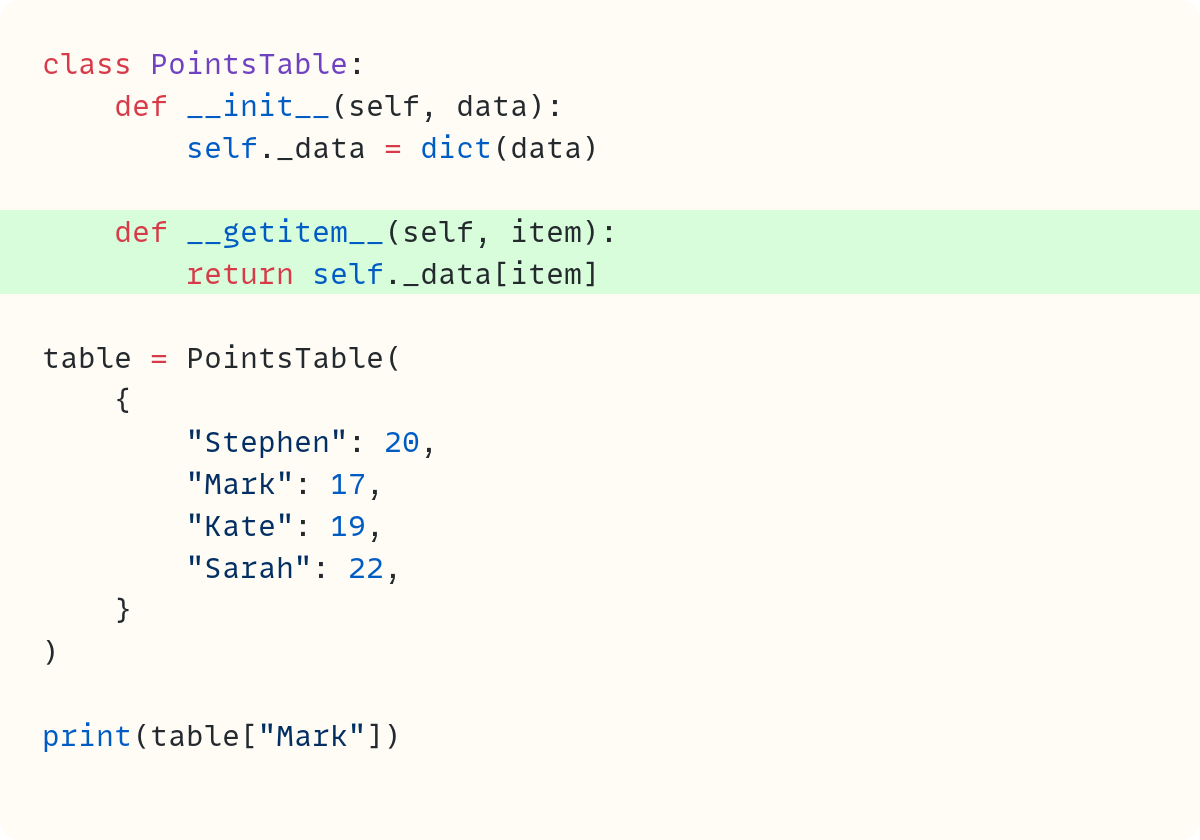
Now, Python finds the .__getitem__() special method. It takes whatever you placed within the square brackets and passes it as an argument to .__getitem__(). Therefore, table["Mark"] returns whatever the call to PointsTable.__getitem__(table, "Mark") returns:
17The code outputs Mark’s points. The PointsTable class is now subscriptable since it has a .__getitem__() special method. The term item generally refers to the objects contained within a data structure. Therefore, __getitem__() is there to let you get an item from within a data structure.
Let’s make this example a bit more interesting before we move on to the other special methods with “get” in their name.
Try the following:

This raises an error:
Traceback (most recent call last):
  File ..., line 18, in <module>
    print(table[”Mark”, “Stephen”])
          ~~~~~^^^^^^^^^^^^^^^^^^^
  File ..., line 6, in __getitem__
    return self._data[item]
           ~~~~~~~~~~^^^^^^
KeyError: (’Mark’, ‘Stephen’)
There’s no key equal to ("Mark", "Stephen"). So, you get a KeyError. Note how Python places parentheses around the two names when showing you the KeyError, even though you didn’t use the parentheses within the square brackets in table["Mark", "Stephen"]. This gives you a clue to what’s happening. But let’s explore this so we’re sure and we don’t just rely on our hunches:
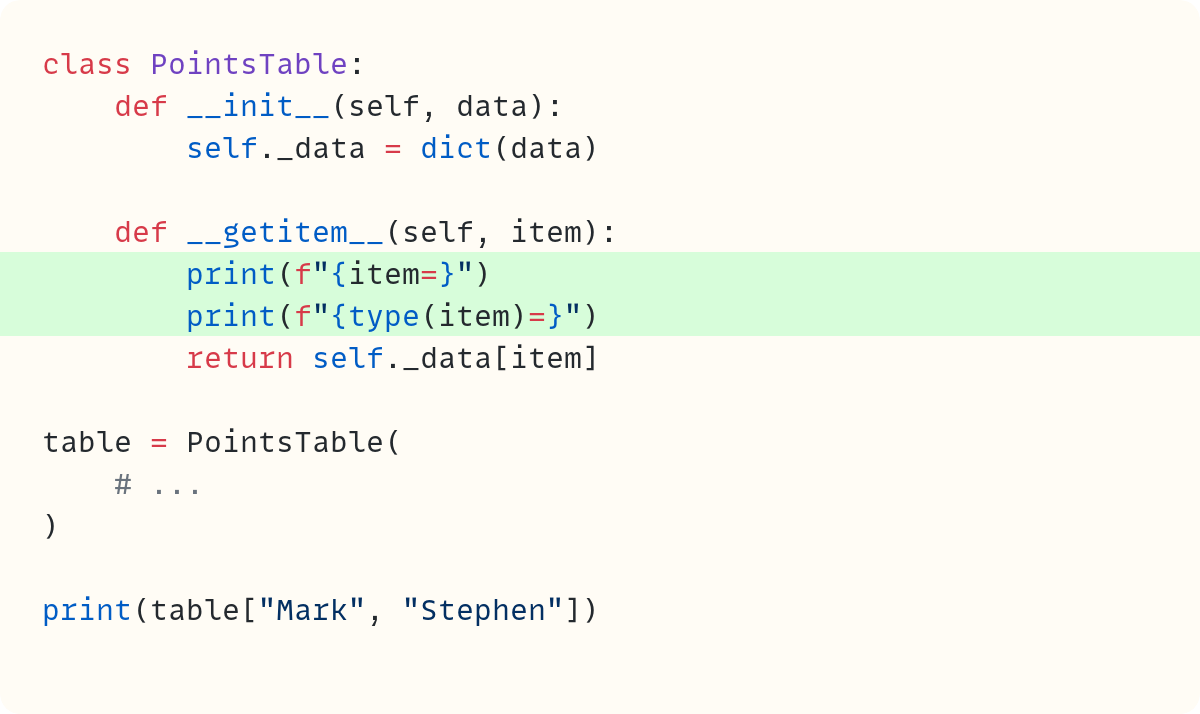
You add two print() calls in .__getitem__(). Here’s what they print out before Python raises the KeyError:
item=(’Mark’, ‘Stephen’)
type(item)=<class ‘tuple’>
The object Python passes to .__getitem__() is the tuple ("Mark", "Stephen"). You decide to make your PointsTable class super-flexible so you can include more than one name within the square brackets notation:
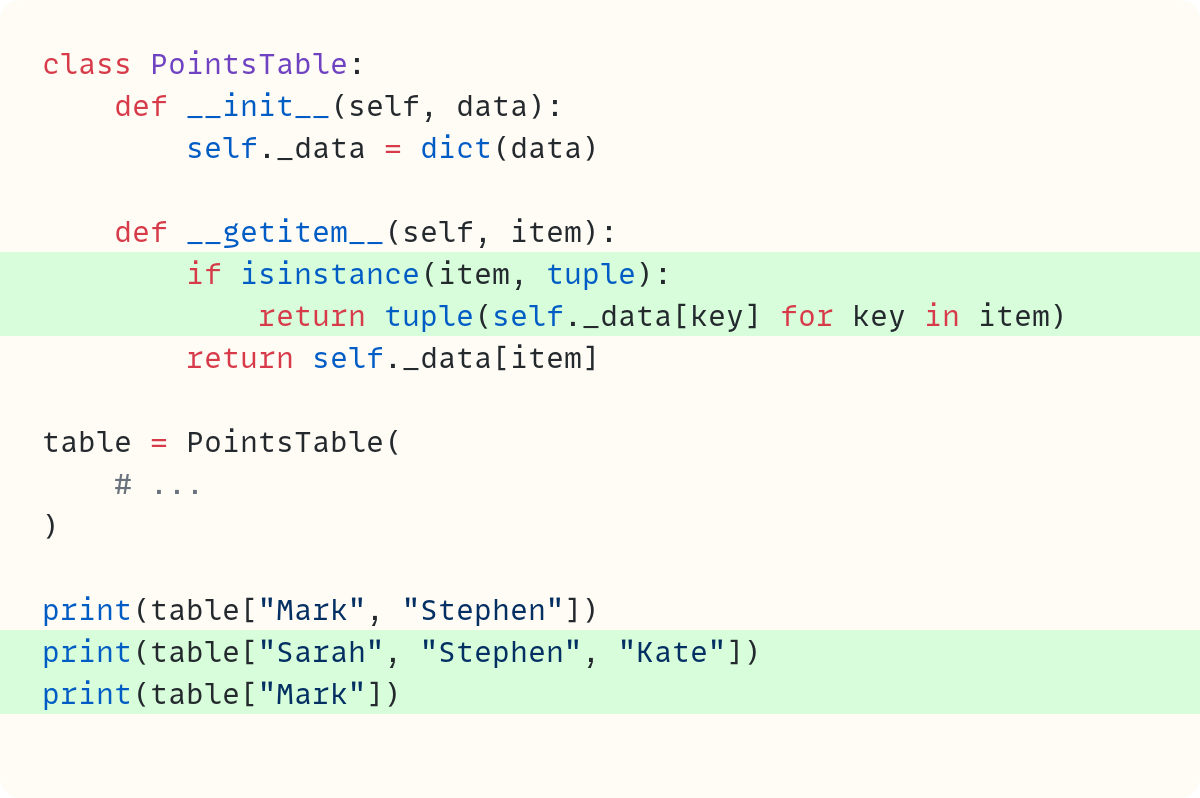
The .__getitem__() method now checks whether item is a tuple first. If it is, then .__getitem__() returns a tuple with all the values. If item is not a tuple, then it must be just a single key, and the square brackets behave in the normal way:
(17, 20)
(22, 20, 19)
17
But note that you can no longer use an actual tuple as a dictionary key. This is fine in this example since all the keys are strings with people’s names.
So, .__getitem__() gives you full control over what happens when you use the square brackets notation to fetch an item from an object. Now, let’s move on to the other “get*” special methods.
Accessing Data Using The Dot Notation, .
You decide you also want PointsTable to work with the dot notation, so that you can use table.Mark to get the number of points Mark has.
Note that I’m adding more features to this class to demonstrate various special methods in this article. I’m not suggesting it’s necessarily always desirable to try to be too fancy with your classes!
Let’s try it out directly first, without making any changes to the class:

Unfortunately, table.Mark raises an error:
Traceback (most recent call last):
  File ..., line 32, in <module>
    print(table.Mark)
          ^^^^^^^^^^
AttributeError: ‘PointsTable’ object has no attribute ‘Mark’
Python is looking for an attribute called Mark. Attributes are the things you can access using the dot notation in Python. Typically, these are data attributes, methods, properties, and other things you can access using the dot. However, as with everything else, Python provides special methods to handle this. But this is where it gets a bit complicated.
.__getattr__()
Let’s take this one step at a time. Let’s add the .__getattr__() special method. You can guess that this special method name stands for get attribute (but it’s not the only special method that stands for get attribute!) Let’s add this method:
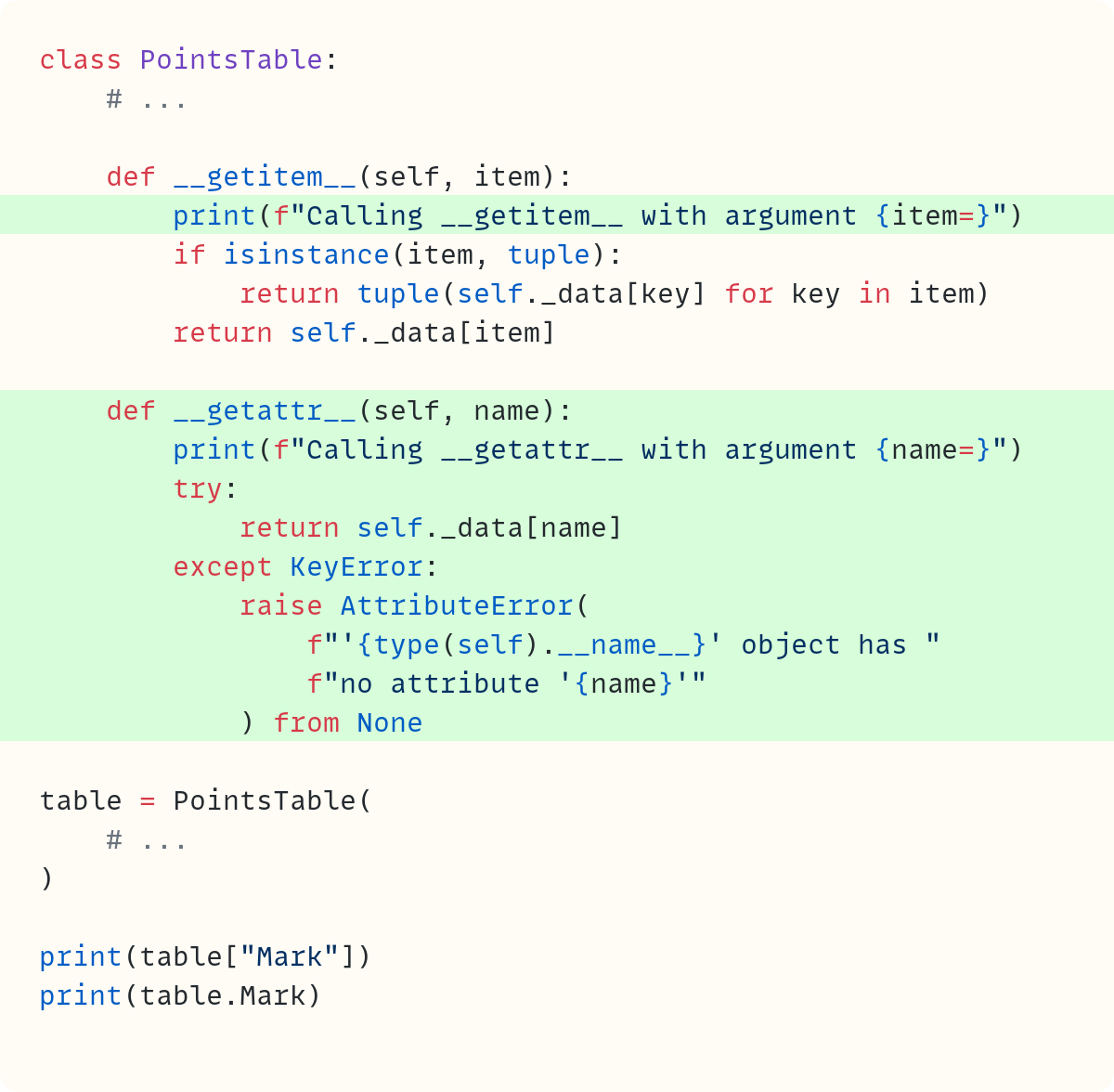
The .__getattr__() special method has a print() call to show when it’s called. This line is not required, but it will help you figure out when Python calls this special method. It’s a way of peeking into Python’s inner workings! For completeness, I added a similar line to .__getitem__() as well.
There are two print() calls at the bottom: one uses the square brackets notation, which you dealt with in the previous section, and the other uses the dot notation. Now, both work:
Calling __getitem__ with argument item=’Mark’
17
Calling __getattr__ with argument name=’Mark’
17
As you’ve seen in the previous section, the square brackets notation relies on .__getitem__().
And as the third and fourth lines in this printout show, Python used .__getattr__() to deal with table.Mark.
Python passed the attribute name to the .__getattr__() special method’s name parameter. This method then fetches the value associated with this name from the dictionary ._data.
This trick only works for keys that are valid attribute names and that don’t clash with real attributes or methods. That’s one reason dictionary-style access is often preferable for arbitrary user data. But let’s stick with this exercise in this article.
Also, you wrote the code such that if self._data[name] raises a KeyError, then .__getattr__() raises an AttributeError, which is what you’d expect if you try to use a name that’s not an attribute after the dot:

This raises an AttributeError:
AttributeError: ‘PointsTable’ object has no attribute ‘Matilda’It seems that .__getattr__() is analogous to .__getitem__() – the first deals with . and the second with []. But...
But things are a bit more complex. What if you try to access a standard attribute, say a data attribute or a method? You haven’t defined any methods in this class, but you do have a data attribute, ._data. It’s marked with a leading underscore, showing you shouldn’t access it directly. But you can “break the rules”. Python won’t stop you:

The output is the following:
{’Stephen’: 20, ‘Mark’: 17, ‘Kate’: 19, ‘Sarah’: 22}Perhaps, this is not surprising. But note that there’s no printout that says that .__getattr__() was called, as you got when you used table.Mark. Let’s look at both outputs together:

The output now is the following:
Calling __getattr__ with argument name=’Mark’
17
{’Stephen’: 20, ‘Mark’: 17, ‘Kate’: 19, ‘Sarah’: 22}
Python called the .__getattr__() special method when you accessed .Mark, but not when you accessed ._data.
This means there’s something else happening behind the scenes.
.__getattribute__()
This is where .__getattribute__() enters the scene. No prizes for guessing that this method name stands for get attribute, but then so did .__getattr__(). This is confusing.
And here’s the thing. It’s .__getattribute__() that gets called each and every time you use the dot notation with an instance. Let’s define it:
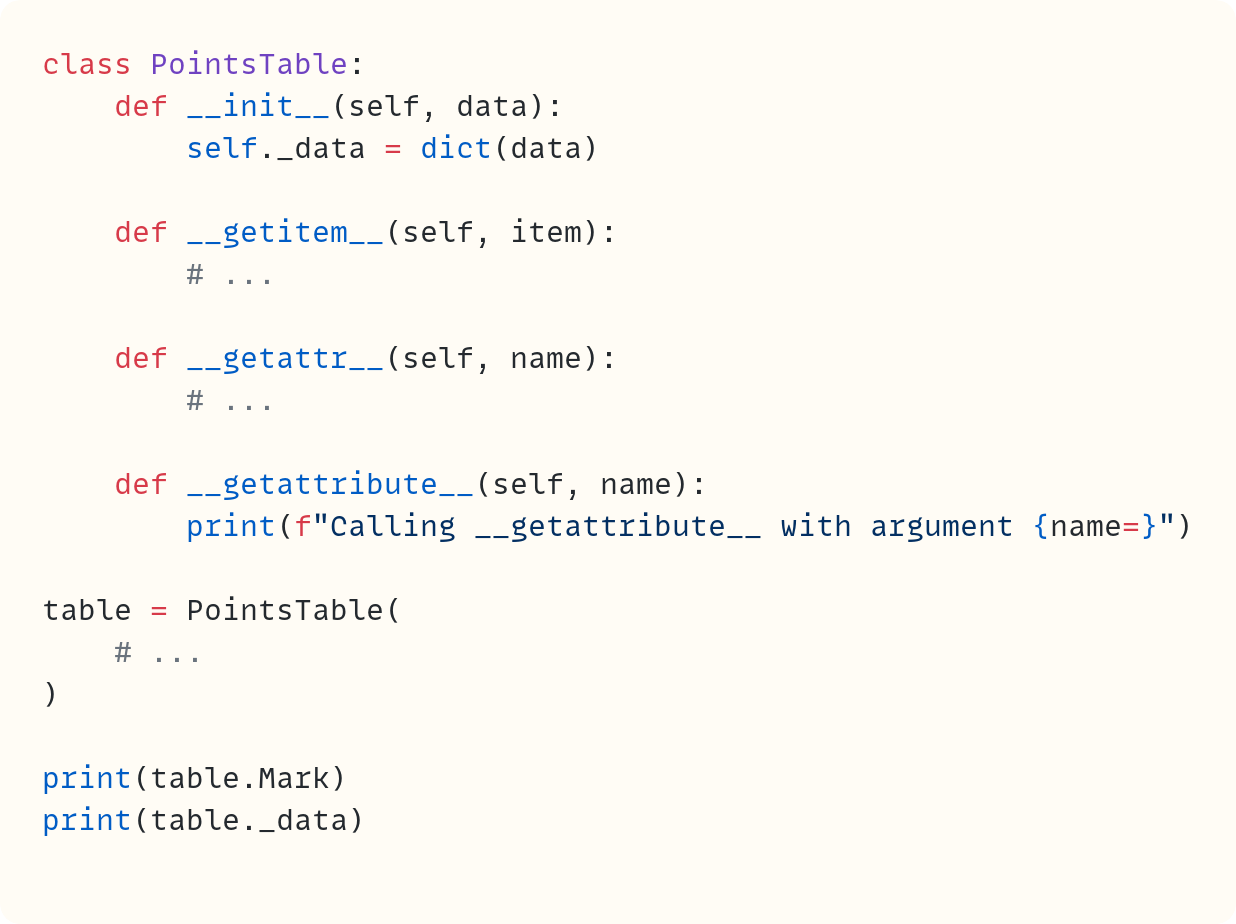
Note that this code breaks lots of things as it is now. We’ll fix it soon. Let’s first look at the output from this code:
Calling __getattribute__ with argument name=’Mark’
None
Calling __getattribute__ with argument name=’_data’
None
As you can see, Python calls .__getattribute__() for both table.Mark and table._data. However, the current .__getattribute__() method does nothing else. Therefore, it returns None. You’ll see soon that this is a bigger problem than you might think.
Let’s try using the dot notation to access an attribute that doesn’t exist:

Every time you use the dot, ., Python calls .__getattribute__(), which, for now, does nothing except print out the self-serving statement to show it was called:
Calling __getattribute__ with argument name=’Mark’
None
Calling __getattribute__ with argument name=’_data’
None
Calling __getattribute__ with argument name=’Janine’
None
Therefore, you can’t access any attribute at the moment. All data attributes and methods are out of reach. You should be careful when overriding .__getattribute__(). In fact, you’ll rarely need to write your own .__getattribute__().
Let’s fix this code by calling object.__getattribute__() from within PointsTable.__getattribute__(). Recall that all Python classes inherit from object. And object.__getattribute__() is where the important logic that Python uses to decide what to do when you use the . lives. You can access object using super():
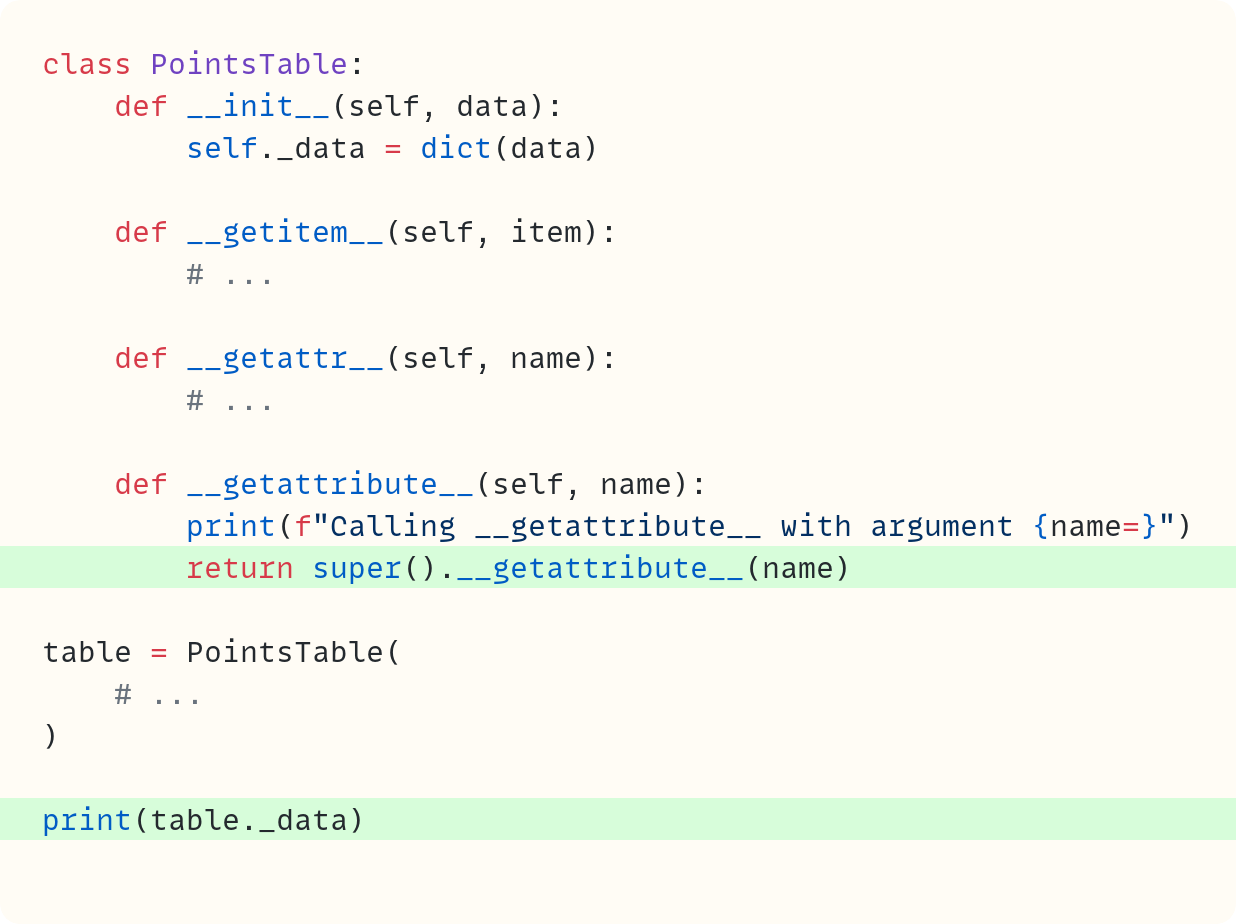
Note that in this class, .__getattribute__() is not doing anything different to the default version except for printing out a statement. I’m using this for demonstration purposes only.
Let’s deal with one print() call at a time. The code above includes print(table._data). You’re fetching the value of a data attribute:
Calling __getattribute__ with argument name=’_data’
{’Stephen’: 20, ‘Mark’: 17, ‘Kate’: 19, ‘Sarah’: 22}
Python calls PointsTable.__getattribute__(), which in turn calls the base class’s object.__getattribute__(). This special method recognises that ._data is an instance variable and fetches its value from the object’s .__dict__.
But let’s see what happens with the .Mark attribute access. Recall that .Mark is not a data attribute or method:

Here’s the output now. Look at the various printouts, too:
Calling __getattribute__ with argument name=’Mark’
Calling __getattr__ with argument name=’Mark’
Calling __getattribute__ with argument name=’_data’
17
When Python sees table.Mark, it calls PointsTable.__getattribute__(table, "Mark"). This call gives rise to the first line printed out above. The base class’s .__getattribute__() doesn’t recognise "Mark" as a data attribute, a method name, or anything else it’s expecting (such as descriptors, which we will discuss soon). So, object.__getattribute__() actually raises an AttributeError in this case, which you can’t see in the output above.
That’s because when .__getattribute__() raises an AttributeError during normal attribute access using the dot, Python checks whether there’s a .__getattr__() defined. If there is, it uses it as a fallback. That’s what happens in this case. You can see that .__getattr__() is called next – that’s the second line printed out above.
But .__getattr__() contains this line: return self._data[name]. There’s a dot in that line, too. So Python needs to access .__getattribute__() again, this time using "_data" as the argument. Since ._data is a data attribute, object.__getattribute__() doesn’t need to use .__getattr__() as a fallback since it knows how to deal with data attributes.
Confused? You’re not alone. This is confusing, I know. And there’s a bit more. But we’ll make sure things are clear by the end of this article.
But first, let’s focus on table.Mark again and let’s comment out, just for now, the definition of .__getattr__():
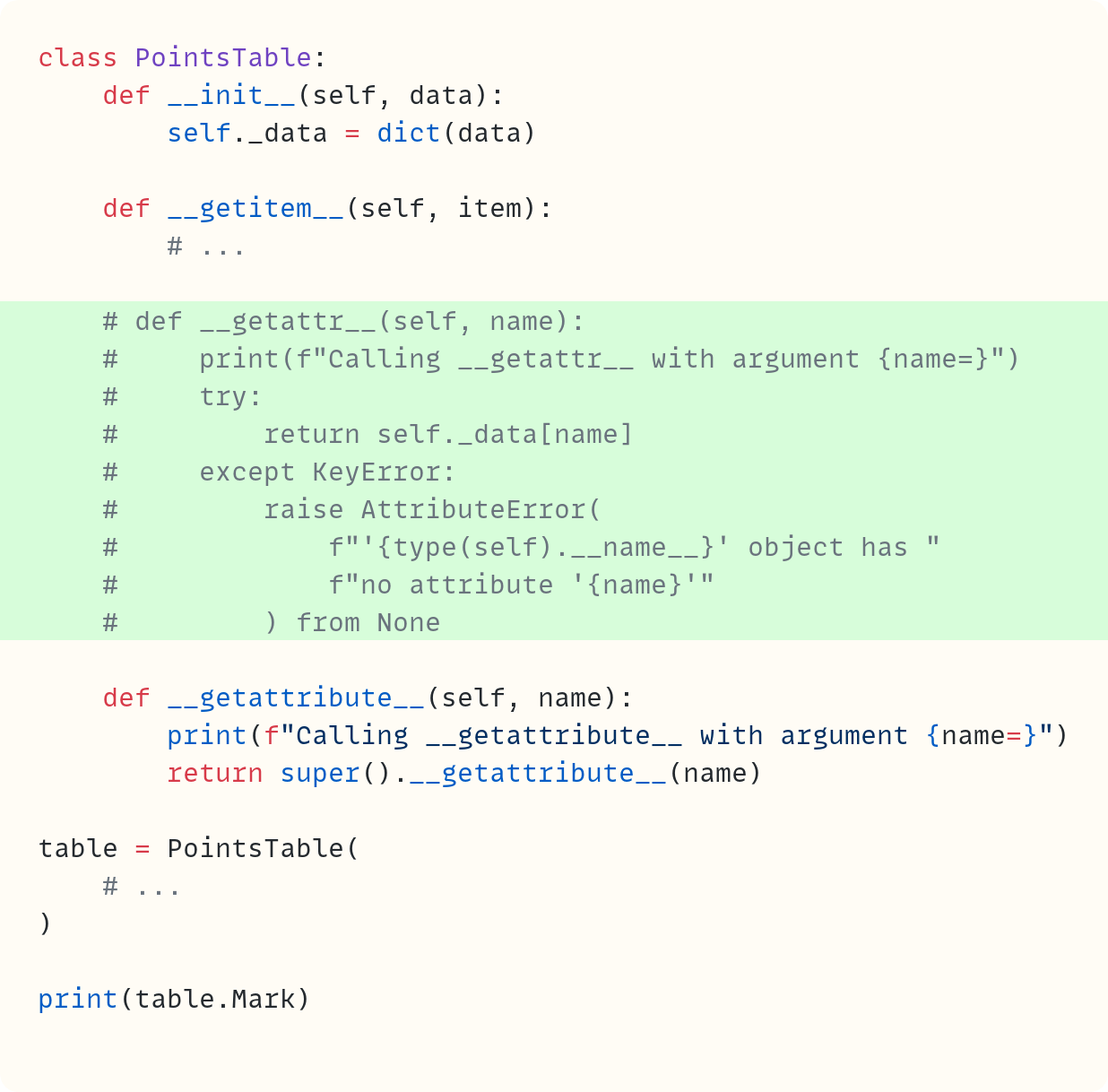
The base class’s .__getattribute__() method works hard to determine whether "Mark" is an attribute it expects. It doesn’t find it, and now, there’s no fallback .__getattr__(), so Python raises an error:
Calling __getattribute__ with argument name=’Mark’
Calling __getattribute__ with argument name=’__dict__’
Calling __getattribute__ with argument name=’__class__’
Traceback (most recent call last):
  ...
AttributeError: ‘PointsTable’ object has no attribute ‘Mark’
You can see a couple of extra printouts, too. These are side effects of Python preparing the error message since we get the printout each time Python uses the dot notation, even when it does so behind the scenes. Let’s not go too far down the rabbit hole in this article. We may never come out again if we go too deep!
You’ve seen that when you use the dot notation, Python calls object.__getattribute__() eventually. That’s why you should include super().__getattribute__() when you override this special method, unless you have a clear (niche) reason why you don’t want to do this. This special method looks in a number of places for the attribute. I’m going to skip a few steps in the hierarchy for now. But we’ll revisit these in the next section (remember, we’re not done yet since there’s still .__get__() to deal with).
The .__getattribute__() special method looks for instance attributes. Let’s temporarily turn .Mark into an instance attribute:
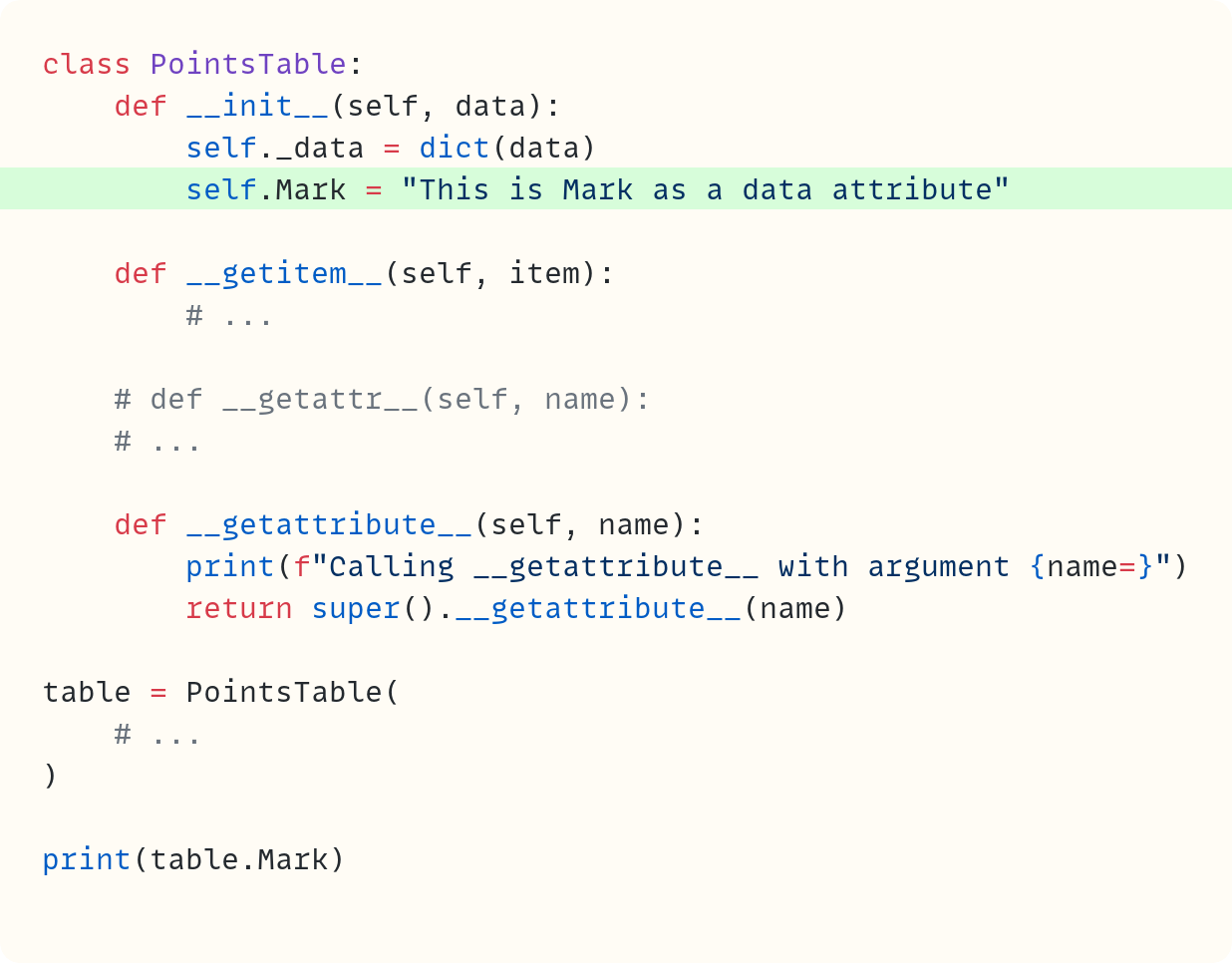
Now, .Mark is a data attribute, so .__getattribute__() finds it:
Calling __getattribute__ with argument name=’Mark’
This is Mark as a data attribute
If it’s not an instance variable, object.__getattribute__() also checks whether it’s a class attribute. Let’s test this:
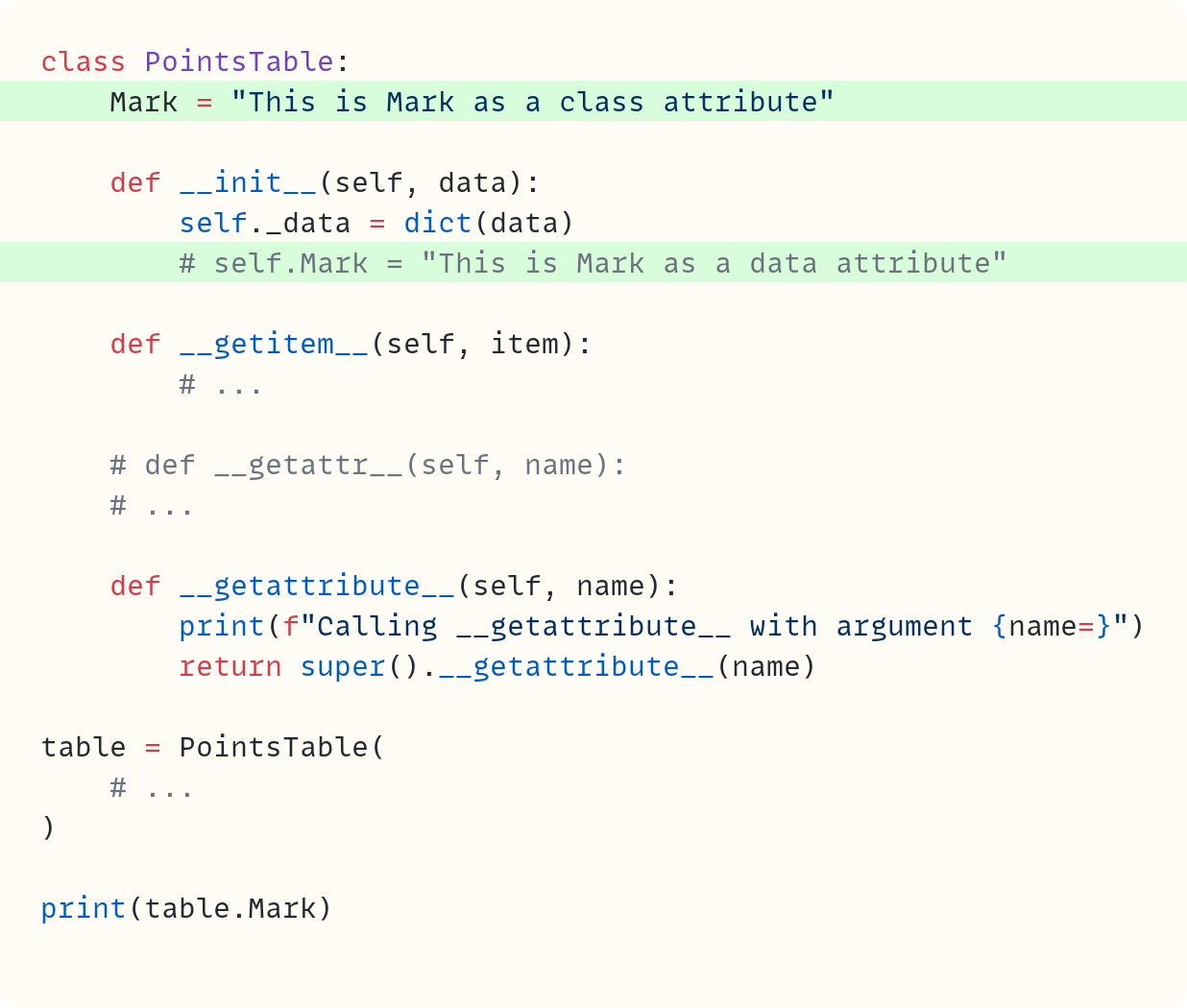
Here’s the output:
Calling __getattribute__ with argument name=’Mark’
This is Mark as a class attribute
Note that the line in .__init__() that defines .Mark as a data attribute is commented out now because instance attributes take precedence over class attributes. Only when all else fails (including the steps I skipped for now), does Python check whether the fallback special method .__getattr__() is there.
So, when you use the dot notation for attribute access (the simplified version, for now):
Python calls
.__getattribute__()It checks for known attributes, such as instance attributes and class attributes (and a bit more – coming soon)
If it doesn’t find anything, then
.__getattribute__()raises anAttributeError. However, Python does one final check before letting this error through to the user: is there a.__getattr__()? If there is, Python calls it to see whether it contains instructions for handling this unknown attribute.
I’m simplifying slightly here. Descriptors complicate the order, and we’ll return to them in the next section.
Note that in real code, you rarely need to define .__getattribute__(). You can rely on the default provided in the object base class in most cases. Most custom attribute behaviour should use .__getattr__() rather than .__getattribute__(). Use .__getattribute__() only when you need to intercept every attribute access. There is rarely a need for this, though.
Common uses for .__getattr__() include delegating missing attributes to another object, implementing lazy loading, or exposing dynamic attributes from structured data.
Here’s the tidied-up code in full so far:
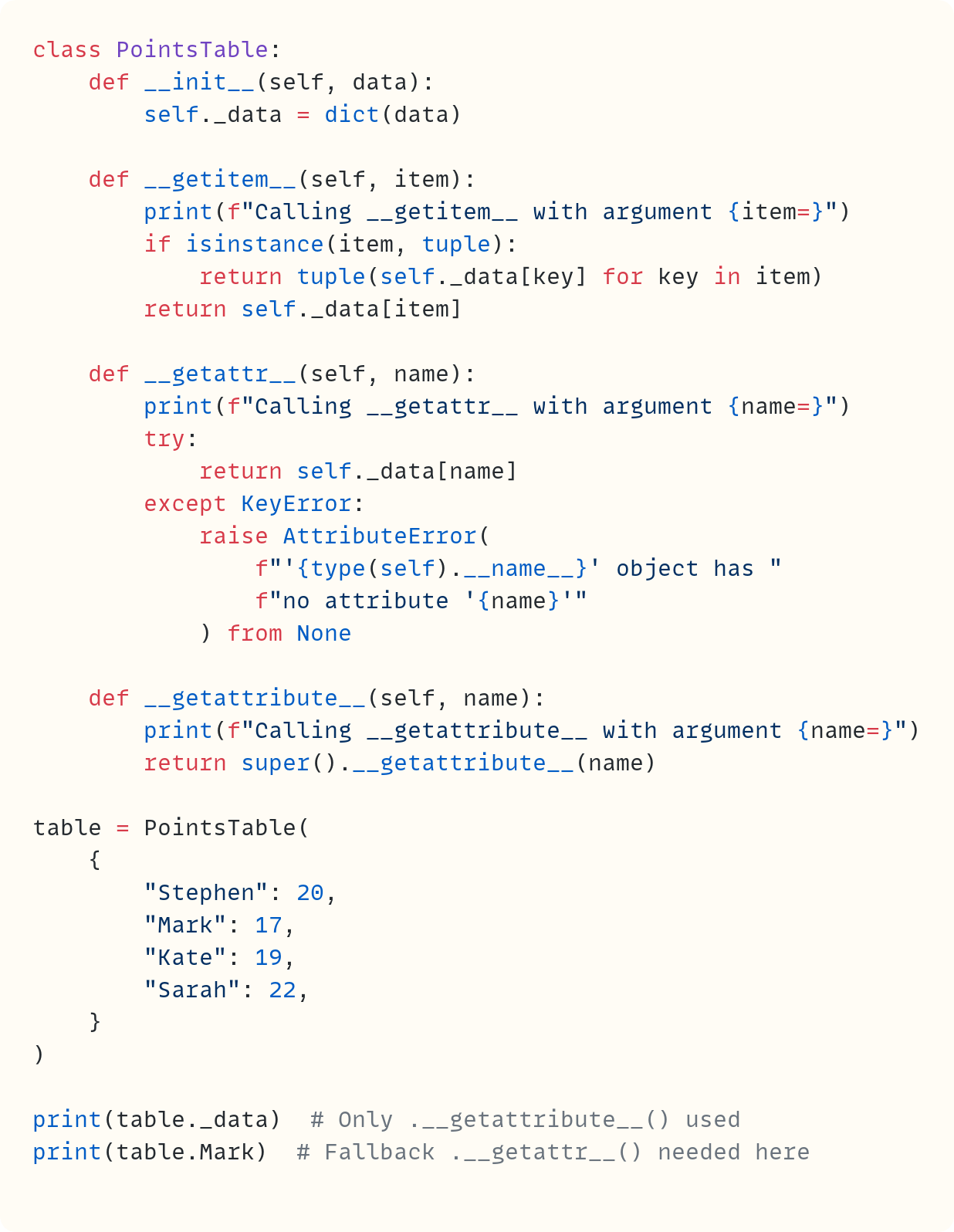
The Asymmetry Between .__getattr__() and .__setattr__()
A short note: There’s an asymmetry between .__getattr__() and .__setattr__() despite their names following the same pattern. As you’ve seen above, .__getattr__() is only used as a fallback when .__getattribute__() doesn’t find the attribute through “normal routes”.
However, .__setattr__() doesn’t have a counterpart analogous to .__getattribute__(). Therefore, .__setattr__() is always used when setting the value of an attribute. Life is simpler in the “setting” world!
In this article, I’m focusing on the “getting” part of things, but some of the same logic applies to “setting”, too.
All The Python Coding Place video courses are included into a single, cost-effective bundle. The courses cover beginner and intermediate level courses, and you also get access to a members-only forum.
The Fourth Horseman: .__get__()
I’ve had this article in my pipeline here on The Python Coding Stack for a very long time. But I never wrote it because I knew that dealing with .__get__() would be a pain and would need a lot of time and space. However, in March, I published The Weird and Wonderful World of Descriptors in Python. If you haven’t read that article yet, well, now is the time!
And therefore I can cheat in this article. I can avoid talking about .__get__() in detail. What follows in this section is a summary of the world of descriptors. See the full article for more details.
If a class has .__get__(), it’s a descriptor class. If it only has .__get__() and it does not define .__set__() or .__delete__(), which are the other methods that make up the descriptor protocol, then the class creates non-data descriptors. Classes that include .__set__() or .__delete__() create data descriptors. This distinction matters when we get back to .__getattribute__() and the order it uses to look for known attributes.
Let’s explore this with a dummy example. This code defines two descriptor classes and another class to test the priority order that object.__getattribute__() uses for different attribute types:
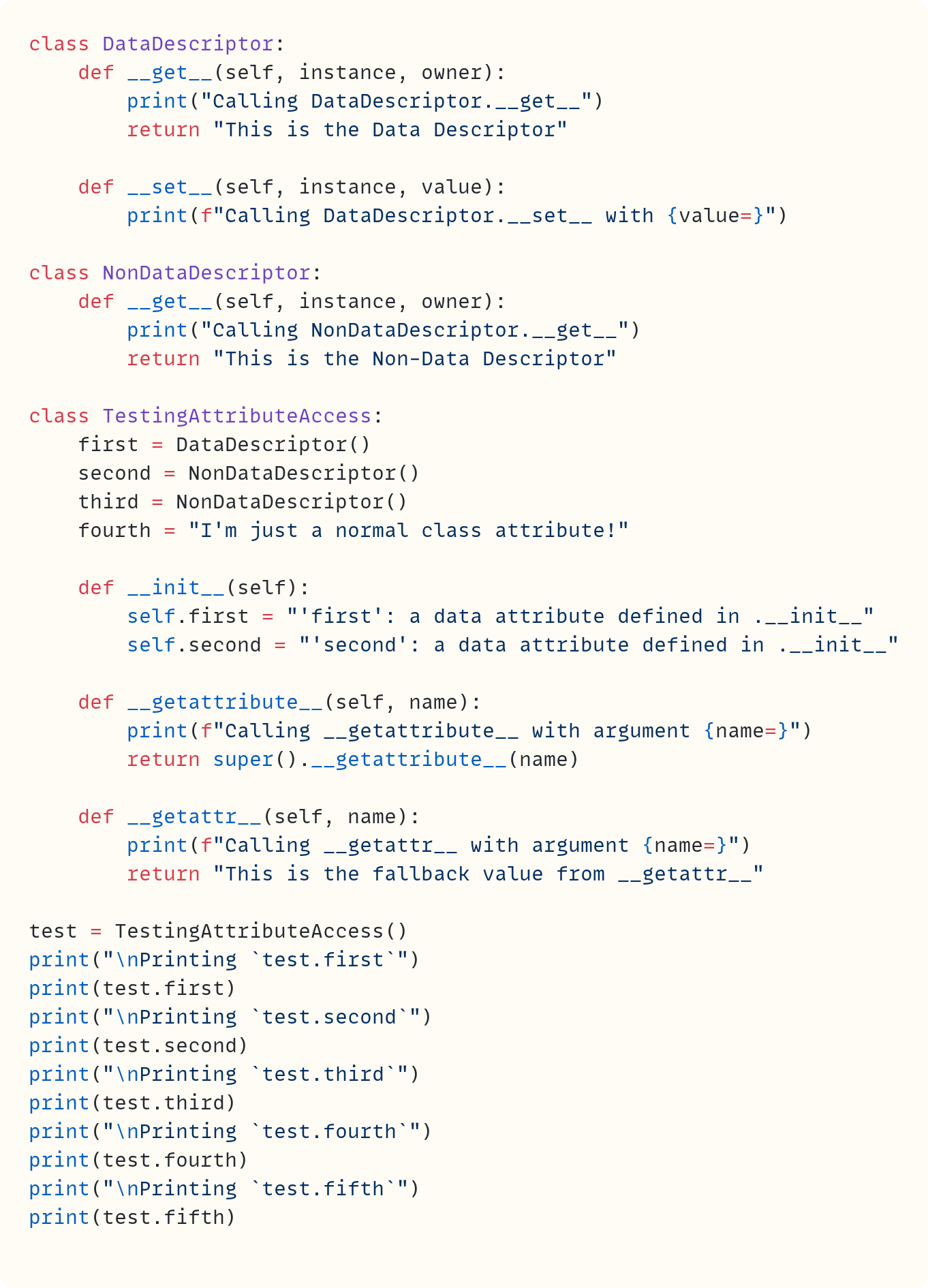
DataDescriptor defines .__get__() and .__set__() methods, which is why it creates data descriptors. However, NonDataDescriptor creates non-data descriptors since the class only defines .__get__().
All the special methods in all classes (except .__init__()) have print() calls so you can see when Python calls them. Before we look at the output from this code, let’s review the five attributes you use in the print() calls and where they appear in the class definitions:
.firstis defined as a data descriptor at the top of theTestingAttributeAccessclass. Recall from the article on descriptors that you initially define descriptors as class attributes within a class. You also assign a value to.firstwithin the class’s.__init__(). More on this soon..secondis also defined as a descriptor at the top of theTestingAttributeAccessclass, but it’s a non-data descriptor since theNonDataDescriptorclass only defines.__get__(). You also assign a value toself.secondwithin.__init__(). We’ll see how the class actually deals with.secondsoon, since it treats it differently from.first..thirdis also defined as a non-data descriptor. However, there is no other assignment tothirdwithin.__init__(). This is the key difference between.secondand.thirdin this code..fourthis a class attribute. It’s not a descriptor and it’s not an instance attribute..fifthis not defined anywhere in the class, but you still callprint(test.fifth).
Let’s look at the whole output from this code and then break it down into steps later:
Calling DataDescriptor.__set__ with value=”’first’: a data attribute defined in .__init__”

Printing `test.first`
Calling __getattribute__ with argument name=’first’
Calling DataDescriptor.__get__
This is the Data Descriptor

Printing `test.second`
Calling __getattribute__ with argument name=’second’
‘second’: a data attribute defined in .__init__

Printing `test.third`
Calling __getattribute__ with argument name=’third’
Calling NonDataDescriptor.__get__
This is the Non-Data Descriptor

Printing `test.fourth`
Calling __getattribute__ with argument name=’fourth’
I’m just a normal class attribute!

Printing `test.fifth`
Calling __getattribute__ with argument name=’fifth’
Calling __getattr__ with argument name=’fifth’
This is the fallback value from __getattr__
There’s plenty to digest there. So, let’s break it down in stages.
0. Creating an instance of TestingAttributeAccess
I want to focus on the “getting” bit from the various print() calls. However, there’s this line output first, so let’s deal with it, too:
Calling DataDescriptor.__set__ with value=”’first’: a data attribute defined in .__init__”This happens when you create the instance of TestingAttributeAccess and assign it to the variable name test. Why? Because first has already been defined as a data descriptor at the time of the class definition. Therefore, when you assign a value to .first during initialisation, the descriptor protocol kicks in.
When you call TestingAttributeAccess(), Python calls the class’s .__init__() and soon finds this expression: self.first = ...
Therefore, Python calls DataDescriptor.__set__() to set the value of this attribute. Note that DataDescriptor.__set__() doesn’t really set anything in this case. Normally, something more meaningful would happen in .__set__(). See The Weird and Wonderful World of Descriptors in Python for more on this.
1. test.first
The next section in the code’s output is the following:
Printing `test.first`
Calling __getattribute__ with argument name=’first’
Calling DataDescriptor.__get__
This is the Data Descriptor
This output is created when you write print(test.first). The dot notation triggers Python to call .__getattribute__(). So, let’s start exploring the hierarchy of checks in .__getattribute__(). What does this special method look for first?
The first thing .__getattribute__() checks is whether the attribute is a data descriptor.
Since .first is a data descriptor, the search stops there. Python calls DataDescriptor.__get__() and returns whatever the .__get__() method returns. This is the string "This is the Data Descriptor" in this demo example.
2. test.second
Let’s look at the next segment in the code’s output. This is generated when you call print(test.second):
Printing `test.second`
Calling __getattribute__ with argument name=’second’
‘second’: a data attribute defined in .__init__
You know the drill by now. The dot notation is the trigger that makes Python call .__getattribute__(). It checks whether the attribute is a data descriptor. But .second is not a data descriptor. You initially define it as a non-data descriptor. Since it’s definitely not a data descriptor, it’s time to move on to the second check in the hierarchy.
The second thing .__getattribute__() checks is whether the attribute is an instance attribute.
Is this attribute name in the object’s .__dict__ dictionary? Instance attributes come second in the hierarchy. Now, you’ve seen that .second is not a data descriptor, which is why we moved to the second check. But is test.second an instance attribute or a non-data descriptor?
You can see from the printout that Python never called NonDataDescriptor.__get__() even though you originally defined .second as a NonDataDescriptor object. The swap occurred when you created the TestingAttributeAccess instance. Python calls the class’s .__init__(), which contains this assignment line: self.second = ....
Since .second is not a data descriptor (it’s a non-data descriptor) and doesn’t have a .__set__(), the descriptor protocol doesn’t kick in here to set the value of this attribute. This is different from .first, which was a data descriptor and, therefore, its .__set__() was responsible for setting the value.
Since the .second non-data descriptor doesn’t have a .__set__(), Python does what it always does in these cases: it assigns the new object, the string "'second': a data attribute defined in .__init__", to test.second. Therefore, test.second is now an instance attribute containing the string rather than the original non-data descriptor.
Although test.second would originally access the non-data descriptor, you created an instance attribute when you initialised the object. It’s now a data attribute, which is an instance attribute.
Note that TestingAttributeAccess.second is still there as a class attribute, and that’s still the non-data descriptor. But test.second now points to another object, the string.
Therefore, when later in the code you call print(test.second), Python calls .__getattribute__() and starts looking through its hierarchy. It’s not a data descriptor. It is an instance attribute. Therefore, it returns its value.
3. test.third
The next block of output is the one generated when you call print(test.third). Recall that .third is a NonDataDescriptor object. So was .second initially. However, unlike .second, Python never creates an instance attribute that’s assigned to test.third since you don’t assign to self.third in .__init__(). Here’s the output:
Printing `test.third`
Calling __getattribute__ with argument name=’third’
Calling NonDataDescriptor.__get__
This is the Non-Data Descriptor
In print(test.third), there’s a dot again, so Python calls .__getattribute__(). This method first checks whether .third is a data descriptor. It is not. Then it checks whether .third is an instance attribute. It is not. So...
The third thing .__getattribute__() checks is whether the attribute is a non-data descriptor.
Non-data descriptors come next in the hierarchy. That’s why you can see the printout saying that Python calls NonDataDescriptor.__get__ and then prints the attribute’s value, which is the value it gets from the non-data descriptor’s .__get__().
Incidentally, ordinary instance methods are functions that also implement the .__get__() special method. They are non-data descriptors. So, methods are found in this third check in the hierarchy of checks when you use the dot notation.
4. test.fourth
It’s test.fourth‘s turn. Here’s the output you get from print(test.fourth):
Printing `test.fourth`
Calling __getattribute__ with argument name=’fourth’
I’m just a normal class attribute!
There’s a dot, so there’s a call to .__getattribute__() which checks whether .fourth is a data descriptor, an instance attribute, or a non-data descriptor, in that order. It’s none of these. Time for the fourth check.
The fourth thing .__getattribute__() checks is whether the attribute is a class attribute.
And look at that! The .fourth attribute is indeed a class attribute.
5. test.fifth
And finally, it’s .fifth‘s turn. You call print(test.fifth) and you get the following:
Printing `test.fifth`
Calling __getattribute__ with argument name=’fifth’
Calling __getattr__ with argument name=’fifth’
This is the fallback value from __getattr__
Yes, yes, there’s a dot again, so Python calls .__getattribute__(). No, it’s not a data descriptor. No, it’s not an instance attribute. No, it’s not a non-data descriptor. No, it’s not a class attribute. It’s nothing. The attribute .fifth doesn’t exist.
When .__getattribute__() fails to find the attribute, Python calls .__getattr__() if this special method exists.
And that’s it. Simple, eh?!?!
Let’s finish off by summarising the order in which Python deals with looking for attributes when you use the dot notation:
The first thing
.__getattribute__()checks is whether the attribute is a data descriptor.The second thing
.__getattribute__()checks is whether the attribute is an instance attribute.The third thing
.__getattribute__()checks is whether the attribute is a non-data descriptor.The fourth thing
.__getattribute__()checks is whether the attribute is a class attribute.Finally, when
.__getattribute__()fails to find the attribute, Python calls.__getattr__()if this special method exists.
The fifth step occurs when you access attributes using the dot notation. If you call .__getattribute__() explicitly, which you rarely need to do, Python doesn’t automatically look for .__getattr__().
Note that Python looks for descriptors, instance and class attributes in the class and its base classes, too, following the method resolution order.
Final Words
Wait for this. I’ve been waiting all article to write this:
Now, you won’t forget the four “get*” special methods.
Got it! (My son just walked out disapprovingly when he read this.)
You may never need to use all of these methods. Maybe you’ll never need to use any of them. But if you ever wondered why there are these four special methods with similar names, now you know what they do. And you dug a bit more underneath the Python surface along the way. And that’s always fun.
Your call…
The Python Coding Place offers something for everyone:
• a super-personalised one-to-one 6-month mentoring option
$ 4,750
• individual one-to-one sessions
$ 125
• a self-led route with access to 60+ hrs of exceptional video courses and a support forum
$ 400

Code in this article uses Python 3.14
The code images used in this article are created using Snappify. [Affiliate link]
Join The Club, the exclusive area for paid subscribers for more Python posts, videos, a members’ forum, and more.
You can also support this publication by making a one-off contribution of any amount you wish.
For more Python resources, you can also visit Real Python—you may even stumble on one of my own articles or courses there!
Also, are you interested in technical writing? You’d like to make your own writing more narrative, more engaging, more memorable? Have a look at Breaking the Rules.
And you can find out more about me at stephengruppetta.com
Further reading related to this article’s topic:
The Manor House, the Oak-Panelled Library, the Vending Machine, and Python’s `
_getitem__()`The Weird and Wonderful World of Descriptors in Python • The Price is Right
Appendix: Code Blocks
Code Block #1
class PointsTable:
    def __init__(self, data):
        self._data = dict(data)

table = PointsTable(
    {
        "Stephen": 20,
        "Mark": 17,
        "Kate": 19,
        "Sarah": 22,
    }
)
Code Block #2
# ...
print(table["Mark"])
Code Block #3
class PointsTable:
    def __init__(self, data):
        self._data = dict(data)

    def __getitem__(self, item):
        return self._data[item]

table = PointsTable(
    {
        "Stephen": 20,
        "Mark": 17,
        "Kate": 19,
        "Sarah": 22,
    }
)

print(table["Mark"])
Code Block #4
# ...
print(table["Mark", "Stephen"])
Code Block #5
class PointsTable:
    def __init__(self, data):
        self._data = dict(data)

    def __getitem__(self, item):
        print(f"{item=}")
        print(f"{type(item)=}")
        return self._data[item]

table = PointsTable(
    # ...
)

print(table["Mark", "Stephen"])
Code Block #6
class PointsTable:
    def __init__(self, data):
        self._data = dict(data)

    def __getitem__(self, item):
        if isinstance(item, tuple):
            return tuple(self._data[key] for key in item)
        return self._data[item]

table = PointsTable(
    # ...
)

print(table["Mark", "Stephen"])
print(table["Sarah", "Stephen", "Kate"])
print(table["Mark"])
Code Block #7
# ...
print(table.Mark)
Code Block #8
class PointsTable:
    # ...

    def __getitem__(self, item):
        print(f"Calling __getitem__ with argument {item=}")
        if isinstance(item, tuple):
            return tuple(self._data[key] for key in item)
        return self._data[item]

    def __getattr__(self, name):
        print(f"Calling __getattr__ with argument {name=}")
        try:
            return self._data[name]
        except KeyError:
            raise AttributeError(
                f"'{type(self).__name__}' object has "
                f"no attribute '{name}'"
            ) from None

table = PointsTable(
    # ...
)

print(table["Mark"])
print(table.Mark)
Code Block #9
# ...
print(table.Matilda)
Code Block #10
# ...
print(table._data)
Code Block #11
# ...
print(table.Mark)
print(table._data)
Code Block #12
class PointsTable:
    def __init__(self, data):
        self._data = dict(data)

    def __getitem__(self, item):
        # ...

    def __getattr__(self, name):
        # ...

    def __getattribute__(self, name):
        print(f"Calling __getattribute__ with argument {name=}")

table = PointsTable(
    # ...
)

print(table.Mark)
print(table._data)
Code Block #13
# ...
print(table.Mark)
print(table._data)
print(table.Janine)
Code Block #14
class PointsTable:
    def __init__(self, data):
        self._data = dict(data)

    def __getitem__(self, item):
        # ...

    def __getattr__(self, name):
        # ...

    def __getattribute__(self, name):
        print(f"Calling __getattribute__ with argument {name=}")
        return super().__getattribute__(name)

table = PointsTable(
    # ...
)

print(table._data)
Code Block #15
# ...
print(table.Mark)
Code Block #16
class PointsTable:
    def __init__(self, data):
        self._data = dict(data)

    def __getitem__(self, item):
        # ...

    # def __getattr__(self, name):
    #     print(f"Calling __getattr__ with argument {name=}")
    #     try:
    #         return self._data[name]
    #     except KeyError:
    #         raise AttributeError(
    #             f"'{type(self).__name__}' object has "
    #             f"no attribute '{name}'"
    #         ) from None

    def __getattribute__(self, name):
        print(f"Calling __getattribute__ with argument {name=}")
        return super().__getattribute__(name)

table = PointsTable(
    # ...
)

print(table.Mark)
Code Block #17
class PointsTable:
    def __init__(self, data):
        self._data = dict(data)
        self.Mark = "This is Mark as a data attribute"

    def __getitem__(self, item):
        # ...

    # def __getattr__(self, name):
    # ...

    def __getattribute__(self, name):
        print(f"Calling __getattribute__ with argument {name=}")
        return super().__getattribute__(name)

table = PointsTable(
    # ...
)

print(table.Mark)
Code Block #18
class PointsTable:
    Mark = "This is Mark as a class attribute"

    def __init__(self, data):
        self._data = dict(data)
        # self.Mark = "This is Mark as a data attribute"

    def __getitem__(self, item):
        # ...

    # def __getattr__(self, name):
    # ...

    def __getattribute__(self, name):
        print(f"Calling __getattribute__ with argument {name=}")
        return super().__getattribute__(name)

table = PointsTable(
    # ...
)

print(table.Mark)
Code Block #19
class PointsTable:
    def __init__(self, data):
        self._data = dict(data)

    def __getitem__(self, item):
        print(f"Calling __getitem__ with argument {item=}")
        if isinstance(item, tuple):
            return tuple(self._data[key] for key in item)
        return self._data[item]

    def __getattr__(self, name):
        print(f"Calling __getattr__ with argument {name=}")
        try:
            return self._data[name]
        except KeyError:
            raise AttributeError(
                f"'{type(self).__name__}' object has "
                f"no attribute '{name}'"
            ) from None

    def __getattribute__(self, name):
        print(f"Calling __getattribute__ with argument {name=}")
        return super().__getattribute__(name)

table = PointsTable(
    {
        "Stephen": 20,
        "Mark": 17,
        "Kate": 19,
        "Sarah": 22,
    }
)

print(table._data)  # Only .__getattribute__() used
print(table.Mark)  # Fallback .__getattr__() needed here
Code Block #20
class DataDescriptor:
    def __get__(self, instance, owner):
        print("Calling DataDescriptor.__get__")
        return "This is the Data Descriptor"

    def __set__(self, instance, value):
        print(f"Calling DataDescriptor.__set__ with {value=}")

class NonDataDescriptor:
    def __get__(self, instance, owner):
        print("Calling NonDataDescriptor.__get__")
        return "This is the Non-Data Descriptor"

class TestingAttributeAccess:
    first = DataDescriptor()
    second = NonDataDescriptor()
    third = NonDataDescriptor()
    fourth = "I'm just a normal class attribute!"

    def __init__(self):
        self.first = "'first': a data attribute defined in .__init__"
        self.second = "'second': a data attribute defined in .__init__"

    def __getattribute__(self, name):
        print(f"Calling __getattribute__ with argument {name=}")
        return super().__getattribute__(name)

    def __getattr__(self, name):
        print(f"Calling __getattr__ with argument {name=}")
        return "This is the fallback value from __getattr__"

test = TestingAttributeAccess()
print("\nPrinting `test.first`")
print(test.first)
print("\nPrinting `test.second`")
print(test.second)
print("\nPrinting `test.third`")
print(test.third)
print("\nPrinting `test.fourth`")
print(test.fourth)
print("\nPrinting `test.fifth`")
print(test.fifth)
For more Python resources, you can also visit Real Python—you may even stumble on one of my own articles or courses there!
Also, are you interested in technical writing? You’d like to make your own writing more narrative, more engaging, more memorable? Have a look at Breaking the Rules.
And you can find out more about me at stephengruppetta.com
Hi Stephen,
This was a really great article. By far the clearest I've read.
Could you do something about the code blocks at the end of the article? They use fancy quote marks instead of the boring ones Python prefers.